Develocity Artifact Cache and Setup Cache User Manual
How Artifact Cache CLI Works
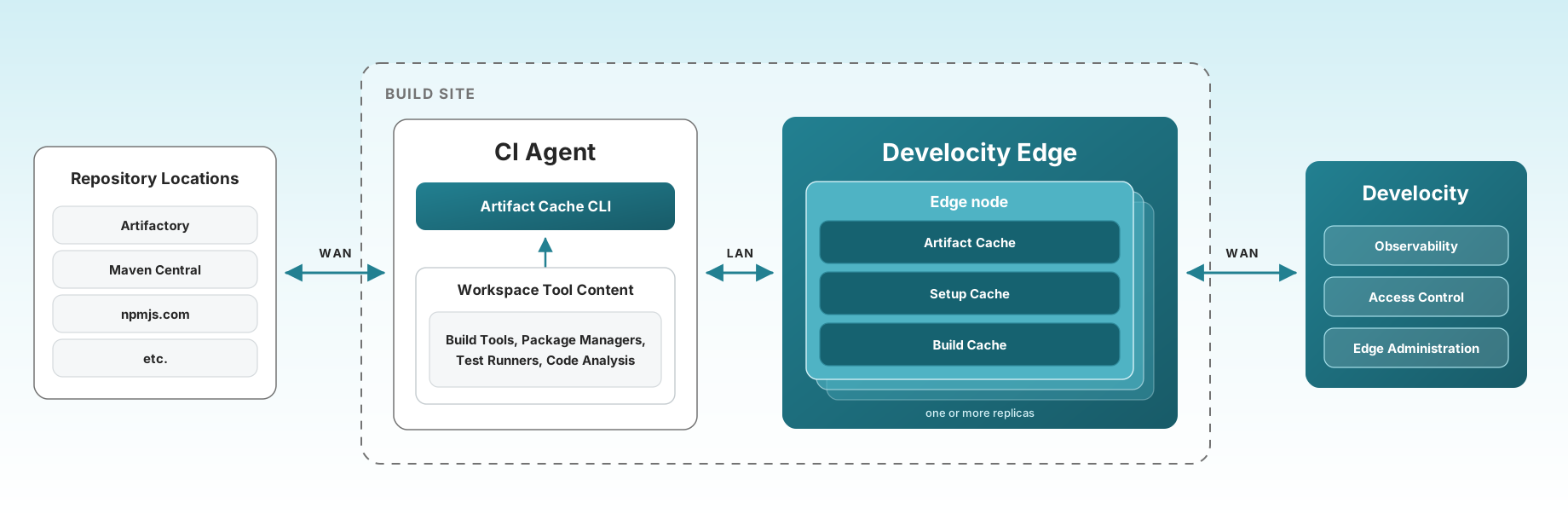
Artifact Cache CLI stores and restores build artifacts to the Develocity Artifact Cache and Setup Cache service on Develocity Edge nodes through three sequential phases: Restore, Build, and Store. Edge nodes manage the available cache storage through an eviction policy, and Develocity manages access control for Artifact Cache CLI clients.
-
Before the build starts, the Artifact Cache CLI restores build dependency and initialization data from a nearby Edge node serving the Artifact Cache and Setup Cache.
-
During build execution, missing dependencies are resolved from various repositories across a WAN.
-
After the build finishes, the Artifact Cache CLI stores any new build dependency and initialization data to the Artifact Cache and Setup Cache.
Obtaining the Artifact Cache CLI Binary
A CI job needs the develocity-artifact-cache-cli JAR file on the agent before it can restore or store cache content.
Fetch it from a Develocity Edge node, or host a copy inside your own network: see Download the CLI.
Requirements
For system requirements to use Develocity Artifact Cache and Setup Cache, see System Requirements.
Getting Started
See Configuring GitHub Actions and Configuring Jenkins to get started on a specific CI platform.
To set up Artifact Cache on another CI platform, or in a pipeline you write yourself, start with Download the CLI. A CI agent needs the Artifact Cache CLI JAR on disk to access Artifact Cache or Setup Cache.
Artifact Cache CLI Commands
Refer to the Artifact Cache CLI Commands Reference for detailed information on available commands and their usage.
Develocity Artifact Cache and Setup Cache Operation Flow
Artifact Cache CLI connects to a Develocity Edge node and runs three sequential phases for each CI job.
Edge Discovery
The Artifact Cache CLI uses Edge discovery to connect to the optimal Edge:
-
Artifact Cache CLI reads the access key of a CI agent Develocity user from the environment variable
DEVELOCITY_ACCESS_KEY. -
Access key identifies a Develocity user.
-
The CI agent Develocity user has the Edge location configured.
-
Artifact Cache CLI connects exclusively to that Edge for the Restore and Store phases.
Alternatively, connect directly to a specific Edge node as described in Connecting Without Edge Discovery.
Connecting Without Edge Discovery
The --dv-edge option connects the Artifact Cache CLI to one Edge node, bypassing discovery through the Develocity server.
A direct connection has two parts:
-
Pass
--dv-edge=<edge_url>instead of--dv-server=<server_url>. -
Include an entry for the Edge host in
DEVELOCITY_ACCESS_KEY.
A discovery-based setup does not need the second part. The Artifact Cache CLI authenticates against the Edge it connects to, so a value that covers only the Develocity server host leaves the request unauthenticated and the Edge rejects it.
export DEVELOCITY_ACCESS_KEY=edge.example.com=abcd1234efgh5678

java -jar develocity-artifact-cache-cli.jar restore \
  --dv-edge=https://edge.example.com \
  --gradle-home=$HOME/.gradle
One access key value can carry entries for several hosts, separated by semicolons. The Artifact Cache CLI uses the entry matching the host it connects to and ignores the others, so a single CI secret can serve both discovery-based and direct connections.
export DEVELOCITY_ACCESS_KEY=develocity.example.com=abcd1234efgh5678;edge.example.com=ijkl9012mnop3456See Environment Variables for the full access key format.
Restore Phase
-
CI job starts: A fresh ephemeral CI agent is created.
-
Checkout code: The repository is cloned.
-
Artifact Cache CLI queries Edge: Requests the image for this job/branch.
-
Edge returns image: Lists all known artifacts for this job.
-
Restore artifacts: Artifact Cache CLI downloads artifacts.
| If an existing caching solution is leveraged by the ephemeral CI agent, be aware that it might clash with Artifact Cache and/or Setup Cache, potentially causing suboptimal caching performance or undefined behavior. |
| The checkout step must be performed before the restore command. |
Store Phase
-
Build completes: The build tool process exits.
-
Artifact Cache CLI scans directories: Identifies new or changed artifacts.
-
Store new artifacts: Uploads to the Edge node.
-
Update image: Records the up-to-date artifact list.
-
Image stored to Edge: The updated image is ready for use by the next CI job.
Observability
Develocity Artifact Cache and Setup Cache records what it did in Build Scan data, the Develocity Reporting and Visualization dashboards, Develocity API, and Develocity MCP servers. The guides below describe how to navigate all these observability surfaces by answering real-world questions.
Guides
- Measure the Effectiveness of Artifact Cache
-
How much download volume does the cache save, and which projects benefit least? Reads the "Dependency Caching" dashboard and the per-build values in a Build Scan.
- Reduce the Impact of Repository Instabilities
-
How much do unstable upstream repositories cost the builds, and how much does the cache absorb? Reads the "Repository Stability" and "JVM Dependencies" dashboards.
- Trace the Origin of a Dependency
-
Where did a given dependency in this build come from? Reads the dependency details inspector in a Build Scan and the "JVM Dependencies" dashboard.
Develocity Artifact Cache and Setup Cache Service Monitoring
The Develocity Artifact Cache and Setup Cache service exposed by Edge nodes can be monitored by following the Monitoring section of the Develocity Edge User Manual.