Configuring Jenkins
This guide shows you how to integrate the Artifact Cache CLI into your Jenkins pipelines.
There are two supported ways to do this:
-
The Develocity Artifact Cache Jenkins plugin is the officially supported and recommended path. It wraps the Artifact Cache CLI, restores the cache before your build, and stores it afterward, from a single Pipeline step.
-
The custom Artifact Cache workflow setup requires orchestrating download and invocation of the Artifact Cache CLI binary as part of your pipeline. Use it for Freestyle jobs, which the plugin does not support, or when you need an option the plugin does not expose.
Prerequisites
Before you begin, ensure you have:
-
Develocity Edge node (version 2.3.0+) deployed
-
Develocity server (version 2026.3.0+)
-
Develocity access key with appropriate permissions
-
Jenkins 2.541.3+ (core) with Pipeline support, plus the Credentials, Plain Credentials, Structs, and Pipeline: API / Basic Steps / Step API companion plugins; Freestyle jobs need the custom Artifact Cache workflow setup below
-
Java 21+ available on any agent that runs the plugin, configured as follows:
-
Added under Manage Jenkins > Tools as a JDK installation with a fixed
Homepath, not an "install automatically" entry. -
The plugin only checks already-resolved JDK homes; it does not trigger installer downloads.
-
The custom Artifact Cache workflow setup additionally requires access to the Artifact Cache CLI binary, served by an Edge node or hosted in your internal network, and Java 21+ installed on the agent.
The plugin downloads and verifies the CLI from the public develocity.ai release channel by default, so hosting it yourself is optional for non-air-gapped installations (see Air-Gapped and Custom CLI Hosting).
See System Requirements for complete details.
Installing the Plugin
The plugin is not listed in the Jenkins Update Center. Install it from the downloaded .hpi file.
Downloading and Verifying the HPI
You can download the latest version of the plugin’s .hpi file and its associated files from the following links:
curl -L -o develocity-artifact-cache-jenkins-plugin-1.1.0.hpi \
  https://docs.develocity.ai/downloads/develocity-artifact-cache-jenkins-plugin/develocity-artifact-cache-jenkins-plugin-1.1.0.hpi
Validate the download against the checksum before installing it:
curl -L -o develocity-artifact-cache-jenkins-plugin-1.1.0.hpi.sha256 \
  https://docs.develocity.ai/downloads/develocity-artifact-cache-jenkins-plugin/develocity-artifact-cache-jenkins-plugin-1.1.0.hpi.sha256
echo "$(cat develocity-artifact-cache-jenkins-plugin-1.1.0.hpi.sha256)  develocity-artifact-cache-jenkins-plugin-1.1.0.hpi" | sha256sum --check
The HPI is signed the same way as the Artifact Cache CLI JAR.
See Verifying the GPG Signature for the steps; verify the .asc file against the .hpi file instead of the JAR, using the same Gradle Inc. signing key.
Manual Upload
Navigate to Manage Jenkins > Plugins > Advanced settings and use Deploy Plugin to upload the downloaded .hpi file directly.
Restart Jenkins if prompted.
Installing With the Jenkins CLI
Install the downloaded file from the command line with the Jenkins CLI:
java -jar jenkins-cli.jar -s https://jenkins.example.com/ install-plugin /path/to/develocity-artifact-cache-jenkins-plugin-1.1.0.hpi -restartReplace the -s URL with your controller’s address, and the path with wherever you downloaded the file.
Mirroring for Air-Gapped or Managed Installs
For a controller with no internet access, or to provision the plugin through configuration-as-code, host the .hpi file and its checksum on an internal file server or artifact repository.
Point your provisioning tooling, such as the Plugin Installation Manager Tool or a custom init script, at that internal copy instead of https://docs.develocity.ai/downloads.
Configuring the Plugin
Configure the plugin by storing the Develocity access key as a Jenkins credential, and optionally setting instance-wide defaults for use across pipelines.
Storing the Access Key
Navigate to Manage Jenkins > Manage Credentials and add a Secret text credential, for example with ID artifact-cache-access-key.
The credential’s value can be a plain Develocity access key, or the <hostname>=<key_value> form (multiple entries separated by ;), so you can reuse a credential already used for that format elsewhere in your Jenkins configuration.
With the <hostname>=<key_value> form, the plugin uses the entry for the endpoint host, whichever of develocityUrl or develocityEdgeUrl the step targets.
Setting Instance-Wide Defaults
An administrator can set instance-wide defaults for the endpoint (develocityUrl, or develocityEdgeUrl in plugin 1.1.0 or later), develocityAccessKeyCredentialId, and develocityTokenExpiry under Manage Jenkins > System, in the Develocity Artifact Cache section.
Setting these once avoids repeating them in every Jenkinsfile.
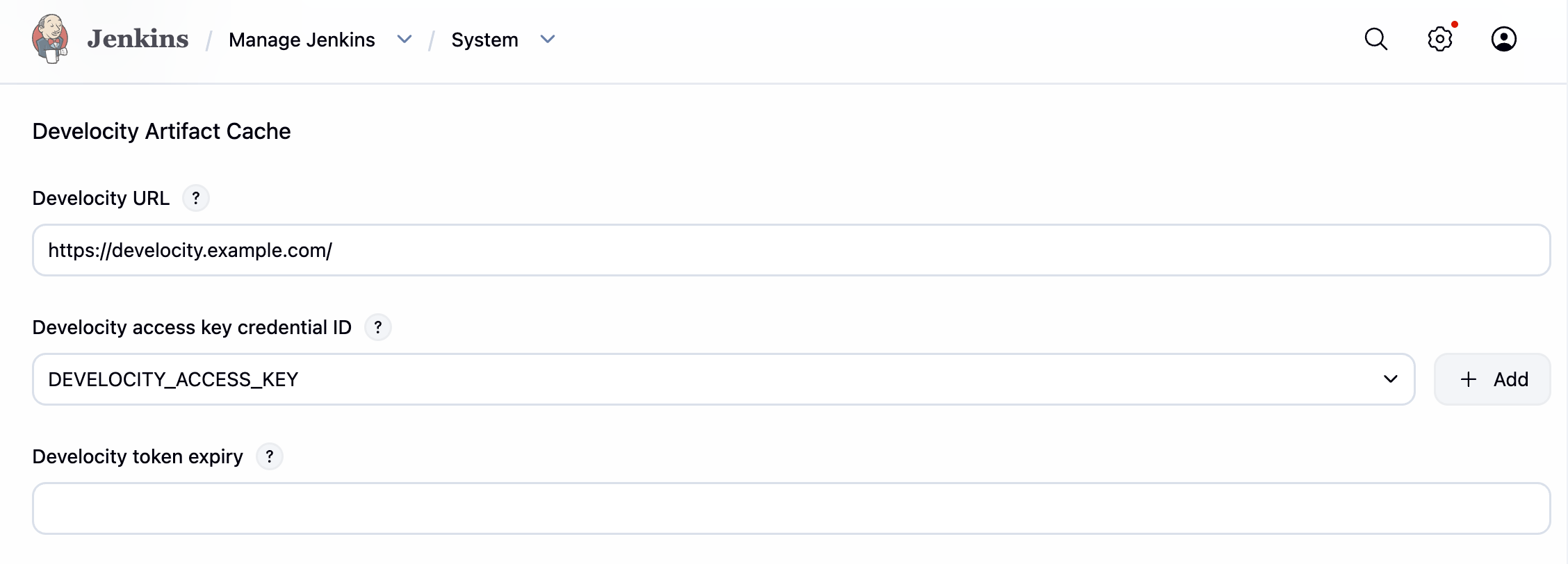
Set one endpoint here, not both; a save carrying both is rejected.
The endpoint and develocityAccessKeyCredentialId fall back to the instance-wide defaults only as a pair: omit both from the Pipeline DSL to use them, or set both there to override them.
A step naming either endpoint therefore takes neither instance-wide endpoint.
develocityTokenExpiry falls back independently of the other two.
Using the Plugin
The withDevelocityArtifactCache step takes two forms:
-
Around a block: used in a scripted
nodeblock or inside a declarative stage’ssteps, it restores the cache before the block runs and stores it afterward. -
Around all stages: used as a declarative pipeline’s
optionsentry, with no block, it restores before the first stage and stores after the last, on the pipeline’s own top-levelagent. This form fails, naming the missing workspace, underagent none, and does not apply to a stage that declares its own separateagent.
The plugin targets one Develocity endpoint: set develocityUrl to reach a Develocity server (passed to the CLI as --dv-server), or develocityEdgeUrl to target a Develocity Edge directly (--dv-edge).
Provide exactly one (they are mutually exclusive), and whichever you set also identifies the host for the access key and short-lived-token exchange.
develocityEdgeUrl requires plugin 1.1.0 or later.
The examples below use the block form inside a stage’s steps.
Gradle
pipeline {
    agent any

    stages {
        stage('Checkout repository') {
            steps {
                checkout scm
            }
        }

        stage('Build project') {
            steps {
                withDevelocityArtifactCache(
                    develocityUrl: 'https://develocity.example.com',
                    develocityAccessKeyCredentialId: 'artifact-cache-access-key'
                ) {
                    sh './gradlew build'
                }
            }
        }
    }
}
Maven
pipeline {
    agent any

    stages {
        stage('Checkout repository') {
            steps {
                checkout scm
            }
        }

        stage('Build project') {
            steps {
                withDevelocityArtifactCache(
                    develocityUrl: 'https://develocity.example.com',
                    develocityAccessKeyCredentialId: 'artifact-cache-access-key'
                ) {
                    sh './mvnw install'
                }
            }
        }
    }
}
npm
pipeline {
    agent any

    stages {
        stage('Checkout repository') {
            steps {
                checkout scm
            }
        }

        stage('Build project') {
            steps {
                withDevelocityArtifactCache(
                    develocityUrl: 'https://develocity.example.com',
                    develocityAccessKeyCredentialId: 'artifact-cache-access-key'
                ) {
                    sh 'npm ci && npm run build'
                }
            }
        }
    }
}
Pipeline DSL Options
| Option | Description |
|---|---|
|
The Develocity server URL, for example |
|
The URL of a Develocity Edge to target directly, for example |
|
ID of the credential holding the Develocity access key. |
|
Allow the endpoint, whichever of |
|
Lifetime, in hours, of the short-lived Develocity token exchanged from the access key before each phase. |
|
Accept the Develocity server’s TLS certificate without verifying it; leave it off and install the certificate into the agents' trust stores instead. |
|
Ordered list of image names to restore from, most preferred first. When unset, the cache phases use the default image naming the CLI already applies (see Automatic Image Name Generation). |
|
Restore from the cache but never store to it. Use it for builds that should not publish into the cache, such as pull request builds. |
|
Write the CLI output and cache summary row to the build log even on a clean run, not only when a phase warns or errors. |
|
Pin the CLI to a specific version instead of the version this plugin bundles. Letters, digits, |
|
Base URL to download the CLI jar from, for agents that cannot reach the public download location (see Air-Gapped and Custom CLI Hosting). |
|
Allow |
|
One |
|
ID of a Secret text credential holding the header line, in the same form as |
|
Expected SHA-256 checksum of the CLI jar, as 64 hexadecimal characters. Needed only when |
|
Extra CLI flags passed through verbatim, for options this plugin does not model, such as |
Resolved options go to the controller’s log at FINE, not the build log.
Add a log recorder on com.gradle.develocity.artifactcache.jenkins under Manage Jenkins > System Log to see them.
cliRepositoryHeader and the values in additionalCliArgs are masked there, keeping only the flag names, because either can carry a secret.
Air-Gapped and Custom CLI Hosting
By default, the plugin downloads the CLI jar from the public develocity.ai release channel and verifies it against a checksum bundled with the plugin.
When the endpoint addresses an Edge node running version 2.3.0 or later, the plugin downloads the CLI jar from that Edge node instead, using the short-lived token the build already exchanged for the Restore phase.
This route needs no extra configuration, and it is the same Edge-serving mechanism Downloading From an Edge Node describes for the custom workflow setup.
An older Edge node, or an endpoint that does not address an Edge node, falls back to the public release channel automatically.
To serve the CLI from your own network instead, set cliRepository to your mirror’s base URL.
An explicit cliRepository always takes priority over the Edge node route.
For an authenticated mirror, add a credential holding the header line and reference it with cliRepositoryHeaderCredentialId:
withDevelocityArtifactCache(
    develocityUrl: 'https://develocity.example.com',
    develocityAccessKeyCredentialId: 'artifact-cache-access-key',
    cliRepository: 'https://mirror.example.com/artifact-cache-cli',
    cliRepositoryHeaderCredentialId: 'ac-repository-header'
) {
    sh './gradlew build'
}
The download, its checksum verification, and the local cache of the verified jar all happen on the agent that runs the build, so cliRepository only needs to be reachable from your agents, not from the controller.
Automatic Image Name Generation
By default, Artifact Cache CLI generates an image name automatically when neither path sets one explicitly. Automatic generation is the recommended approach: it derives the name from the build context, your project’s repository data, and the CI runner’s environment, so you do not have to choose or maintain a name yourself.
The Artifact Cache CLI inspects the following environment variables when generating image names for Jenkins:
-
JOB_NAME -
JENKINS_HOME
Overriding the Generated Name
Set an explicit name only when you need to control the value, for example to share one cache across differently-named jobs.
With the plugin, provide it through the imageNames option.
With the custom Artifact Cache workflow setup, provide it with the --image-name CLI option or the ARTIFACT_CACHE_IMAGE environment variable.
Branch-Aware Caching
The plugin derives DEVELOCITY_ARTIFACT_CACHE_BRANCH_NAME and DEVELOCITY_ARTIFACT_CACHE_BASE_BRANCH_NAME for you, once per build, from the multibranch pipeline’s own BRANCH_NAME and CHANGE_TARGET variables, falling back to the Git plugin’s branch variables.
No DSL option or environment block is needed for this.
An environment variable already set in the build, for example through withEnv, wins over the derived value.
The custom Artifact Cache workflow setup does not derive these automatically; see Setting the Branch Name below.
Cache Summary
Each build the plugin instruments gets a cache summary on the build page: one row per phase, with outcome, detected tools, entry count, entry size, duration, and any warning. A build that never reaches a phase, for example because no compatible JDK was found, still gets a row naming why.
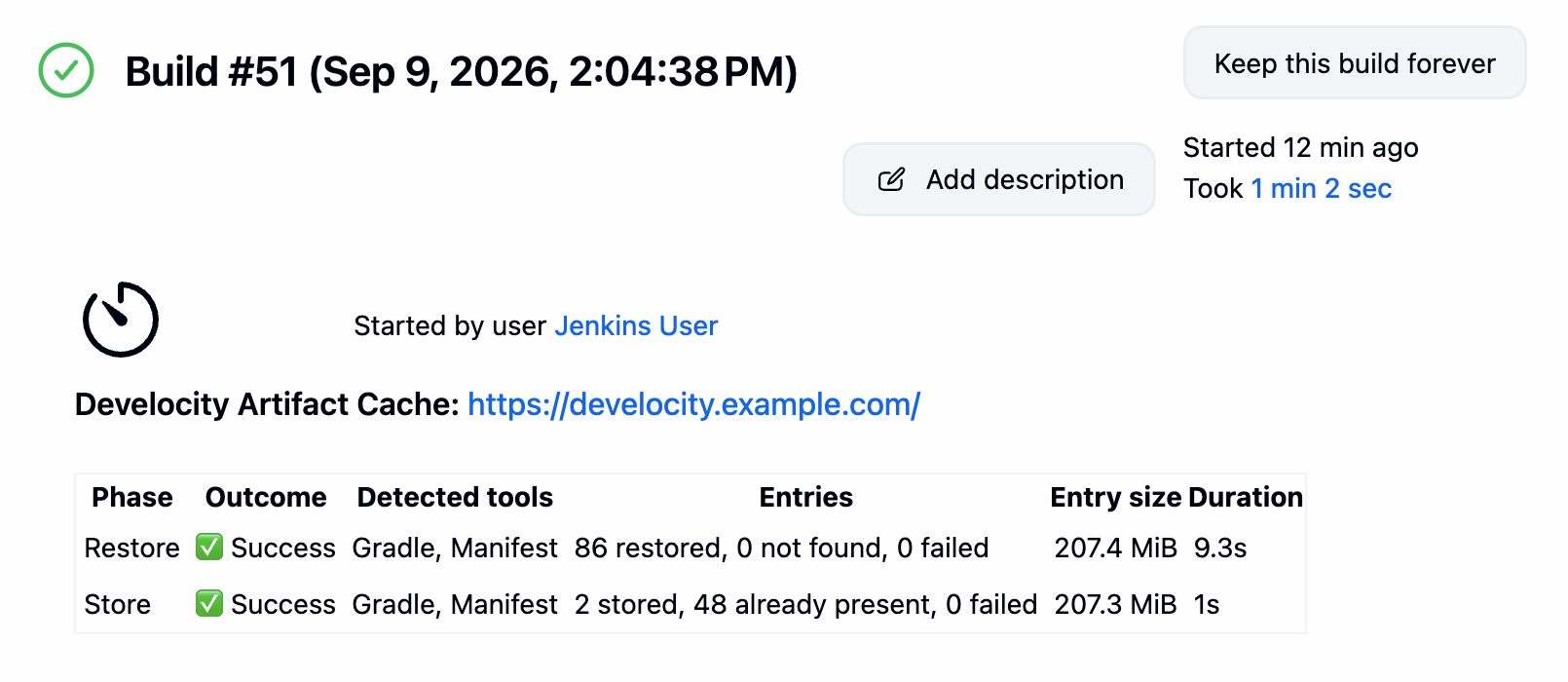
Each row names the phase (Restore or Store), whether it succeeded, the tools it detected, how many entries it restored or stored, the total entry size, and how long it took. The custom Artifact Cache workflow setup does not add this; persist the CLI log file as a build artifact instead, as shown in Gradle Project Setup below.
Custom Artifact Cache Workflow Setup
Use the custom Artifact Cache workflow setup for a Freestyle job, which the plugin does not support, or when you need a CLI option the plugin does not expose.
This approach downloads the CLI and runs the restore and store commands yourself.
Storing Credentials
Navigate to Manage Jenkins > Manage Credentials and add:
| ID | Type | Value |
|---|---|---|
|
Secret text |
Your Develocity access key: |
|
Username with password |
Credentials for your internal artifact repository |
If you use a custom internal artifact repository location, verify the "Provision and configure Artifact Cache" stage in your pipeline.
Ensure the curl command’s authentication parameters (-u) and download URL match your repository’s requirements.
|
Setting the Branch Name
For Jenkins, you must manually set the following environment variables:
-
DEVELOCITY_ARTIFACT_CACHE_BRANCH_NAME- The current repository branch (e.g.,mainorfeature-branch-name) -
DEVELOCITY_ARTIFACT_CACHE_BASE_BRANCH_NAME- The base repository branch (e.g.,main)
For multibranch pipelines, set these values dynamically:
environment {
    DEVELOCITY_ARTIFACT_CACHE_BRANCH_NAME = "${ env.BRANCH_NAME }"
    DEVELOCITY_ARTIFACT_CACHE_BASE_BRANCH_NAME = "${ env.CHANGE_TARGET }"
}
The values above automatically adapt for multi-branch pipelines. For regular pipelines, set them to hard-coded values:
environment {
    DEVELOCITY_ARTIFACT_CACHE_BRANCH_NAME = "main"
    DEVELOCITY_ARTIFACT_CACHE_BASE_BRANCH_NAME = "main"
}
Gradle Project Setup
Shared Build Logic Caching
Starting with Artifact Cache CLI version 1.1.0, the Setup Cache automatically caches shared Gradle build logic defined in buildSrc and included builds.
This feature requires the Develocity Gradle Plugin version 4.4.1 or later, and has the following constraints:
-
The absolute project checkout path must remain constant across builds. Jenkins uses a stable workspace path by default (
/var/lib/jenkins/workspace/<job-name>), but renaming jobs or using custom workspace directories invalidates the cache. -
The repository checkout must happen before the
restorecommand.
Complete Pipeline Example
pipeline {
    agent any

    environment {
        // Artifact Cache Configuration
        ARTIFACT_CACHE_CLI_VERSION = '1.7.0'
        // ARTIFACT_CACHE_IMAGE is intentionally omitted so the image name is
        // generated automatically, which is the recommended default. Set it only
        // when you need to override the generated name.
        // Develocity
        DV_SERVER = 'https://<develocity.address>'
        // Artifact Cache CLI
        ARTIFACT_CACHE_REPO = 'https://your-internal-repo.example.com/path/to/artifact-cache-cli'
        // Misc
        ARTIFACT_CACHE_CLI_FILENAME = 'develocity-artifact-cache-cli'
        ARTIFACT_CACHE_OPTS = "--gradle-home=${ env.HOME }/.gradle --reporting-directory=${ env.WORKSPACE }/.develocity/artifact-cache"
    }

    stages {
        stage('Checkout repository') {
            steps {
                checkout scm
            }
        }

        stage('Provision and configure Artifact Cache') {
            steps {
                script {
                    def jdkHome = tool name: 'jdk21', type: 'jdk'
                    def artifactCacheDir = "${ env.HOME }/.jenkins-tools/develocity/${ env.ARTIFACT_CACHE_CLI_VERSION }"
                    def artifactCacheJar = "${ artifactCacheDir }/${ env.ARTIFACT_CACHE_CLI_FILENAME }.jar"

                    withCredentials([usernamePassword(credentialsId: 'artifact-cache-repo', usernameVariable: 'USER', passwordVariable: 'PASS')]) {
                        sh """
                        if [ ! -f "${ artifactCacheJar }" ]; then
                            echo "Downloading Artifact Cache CLI v${ env.ARTIFACT_CACHE_CLI_VERSION }..."
                            mkdir -p "${ artifactCacheDir }"
                            curl --location --fail --silent --show-error \\
                              --connect-timeout 5 --max-time 30 \\
                              --retry 3 --retry-delay 3 --retry-max-time 60 \\
                              -u "\$USER:\$PASS" \\
                              "${ env.ARTIFACT_CACHE_REPO }/com/gradle/${ env.ARTIFACT_CACHE_CLI_FILENAME }/${ env.ARTIFACT_CACHE_CLI_VERSION }/${ env.ARTIFACT_CACHE_CLI_FILENAME }-${ env.ARTIFACT_CACHE_CLI_VERSION }.jar" \\
                              --output "${ artifactCacheJar }"
                        fi
                    """
                    }

                    // Set reusable command variables
                    env.ARTIFACT_CACHE_CMD = "${ jdkHome }/bin/java -jar ${ artifactCacheJar }"
                    def imageName = env.ARTIFACT_CACHE_IMAGE ? "--image-name=${ env.ARTIFACT_CACHE_IMAGE }" : ""
                    env.ARTIFACT_CACHE_CMD_OPTS = "--dv-server=${ env.DV_SERVER } ${ imageName } ${ env.ARTIFACT_CACHE_OPTS }"
                }
            }
        }

        stage('Restore from Artifact Cache') {
            steps {
                script {
                    try {
                        withCredentials([string(credentialsId: 'artifact-cache-access-key', variable: 'DEVELOCITY_ACCESS_KEY')]) {
                            sh """
                                ${ env.ARTIFACT_CACHE_CMD } restore ${ env.ARTIFACT_CACHE_CMD_OPTS }
                            """
                        }
                    } catch (e) {
                        echo "WARNING: Could not restore the Artifact Cache. The build will proceed but may be slower."
                    }
                }
            }
        }
        stage('Build project') {
            steps {
                sh './gradlew build'
            }
        }
    }

    post {
        success {
            script {
                try {
                    withCredentials([string(credentialsId: 'artifact-cache-access-key', variable: 'DEVELOCITY_ACCESS_KEY')]) {
                        sh """
                             ${ env.ARTIFACT_CACHE_CMD } store ${ env.ARTIFACT_CACHE_CMD_OPTS }
                        """
                    }
                } catch (e) {
                    echo "WARNING: Failed to store in the Artifact Cache."
                }
            }
        }
        always {
            script {
                // Persist Artifact Cache Logs
                def logPath = ".develocity/artifact-cache/artifact-cache.log"
                if (fileExists(logPath)) {
                    archiveArtifacts artifacts: logPath, allowEmptyArchive: true, fingerprint: false
                }
            }
        }
    }
}
Maven Project Setup
Configuration
Change only the ARTIFACT_CACHE_OPTS:
environment {
    ARTIFACT_CACHE_OPTS = "--maven-home=${ env.HOME }/.m2"
}
Complete Pipeline Example
pipeline {
    agent any

    environment {
        // Artifact Cache Configuration
        ARTIFACT_CACHE_CLI_VERSION = '1.7.0'
        // ARTIFACT_CACHE_IMAGE is intentionally omitted so the image name is
        // generated automatically, which is the recommended default. Set it only
        // when you need to override the generated name.
        // Develocity
        DV_SERVER = 'https://<develocity.address>'
        // Artifact Cache CLI
        ARTIFACT_CACHE_REPO = 'https://your-internal-repo.example.com/path/to/artifact-cache-cli'
        // Misc
        ARTIFACT_CACHE_CLI_FILENAME = 'develocity-artifact-cache-cli'
        ARTIFACT_CACHE_OPTS = "--maven-home=${ env.HOME }/.m2 --reporting-directory=${ env.WORKSPACE }/.develocity/artifact-cache"
    }

    stages {
        stage('Checkout repository') {
            steps {
                checkout scm
            }
        }

        stage('Provision and configure Artifact Cache') {
            steps {
                script {
                    def jdkHome = tool name: 'jdk21', type: 'jdk'
                    def artifactCacheDir = "${ env.HOME }/.jenkins-tools/develocity/${ env.ARTIFACT_CACHE_CLI_VERSION }"
                    def artifactCacheJar = "${ artifactCacheDir }/${ env.ARTIFACT_CACHE_CLI_FILENAME }.jar"

                    withCredentials([usernamePassword(credentialsId: 'artifact-cache-repo', usernameVariable: 'USER', passwordVariable: 'PASS')]) {
                        sh """
                        if [ ! -f "${ artifactCacheJar }" ]; then
                            echo "Downloading Artifact Cache CLI v${ env.ARTIFACT_CACHE_CLI_VERSION }..."
                            mkdir -p "${ artifactCacheDir }"
                            curl --location --fail --silent --show-error \\
                              --connect-timeout 5 --max-time 30 \\
                              --retry 3 --retry-delay 3 --retry-max-time 60 \\
                              -u "\$USER:\$PASS" \\
                              "${ env.ARTIFACT_CACHE_REPO }/com/gradle/${ env.ARTIFACT_CACHE_CLI_FILENAME }/${ env.ARTIFACT_CACHE_CLI_VERSION }/${ env.ARTIFACT_CACHE_CLI_FILENAME }-${ env.ARTIFACT_CACHE_CLI_VERSION }.jar" \\
                              --output "${ artifactCacheJar }"
                        fi
                    """
                    }

                    // Set reusable command variables
                    env.ARTIFACT_CACHE_CMD = "${ jdkHome }/bin/java -jar ${ artifactCacheJar }"
                    def imageName = env.ARTIFACT_CACHE_IMAGE ? "--image-name=${ env.ARTIFACT_CACHE_IMAGE }" : ""
                    env.ARTIFACT_CACHE_CMD_OPTS = "--dv-server=${ env.DV_SERVER } ${ imageName } ${ env.ARTIFACT_CACHE_OPTS }"
                }
            }
        }

        stage('Restore from Artifact Cache') {
            steps {
                script {
                    try {
                        withCredentials([string(credentialsId: 'artifact-cache-access-key', variable: 'DEVELOCITY_ACCESS_KEY')]) {
                            sh """
                                ${ env.ARTIFACT_CACHE_CMD } restore ${ env.ARTIFACT_CACHE_CMD_OPTS }
                            """
                        }
                    } catch (e) {
                        echo "WARNING: Could not restore the Artifact Cache. The build will proceed but may be slower."
                    }
                }
            }
        }
        stage('Build project') {
            steps {
                sh './mvnw install'
            }
        }
    }

    post {
        success {
            script {
                try {
                    withCredentials([string(credentialsId: 'artifact-cache-access-key', variable: 'DEVELOCITY_ACCESS_KEY')]) {
                        sh """
                             ${ env.ARTIFACT_CACHE_CMD } store ${ env.ARTIFACT_CACHE_CMD_OPTS }
                        """
                    }
                } catch (e) {
                    echo "WARNING: Failed to store in the Artifact Cache."
                }
            }
        }
        always {
            script {
                // Persist Artifact Cache Logs
                def logPath = ".develocity/artifact-cache/artifact-cache.log"
                if (fileExists(logPath)) {
                    archiveArtifacts artifacts: logPath, allowEmptyArchive: true, fingerprint: false
                }
            }
        }
    }
}npm Project Setup
Configuration
Change only the ARTIFACT_CACHE_OPTS:
environment {
    ARTIFACT_CACHE_OPTS = "--npm-home=${ env.HOME }/.npm"
}
Complete Pipeline Example
pipeline {
    agent any
    environment {
        // Artifact Cache Configuration
        ARTIFACT_CACHE_CLI_VERSION = '1.7.0'
        // ARTIFACT_CACHE_IMAGE is intentionally omitted so the image name is
        // generated automatically, which is the recommended default. Set it only
        // when you need to override the generated name.
        // Develocity
        DV_SERVER = 'https://<develocity.address>'
        // Artifact Cache CLI
        ARTIFACT_CACHE_REPO = 'https://your-internal-repo.example.com/path/to/artifact-cache-cli'
        // Misc
        ARTIFACT_CACHE_CLI_FILENAME = 'develocity-artifact-cache-cli'
        ARTIFACT_CACHE_OPTS = "--npm-home=${ env.HOME }/.npm --reporting-directory=${ env.WORKSPACE }/.develocity/artifact-cache"
    }
    stages {
        stage('Checkout repository') {
            steps {
                checkout scm
            }
        }
        stage('Provision and configure Artifact Cache') {
            steps {
                script {
                    def jdkHome = tool name: 'jdk21', type: 'jdk'
                    def artifactCacheDir = "${ env.HOME }/.jenkins-tools/develocity/${ env.ARTIFACT_CACHE_CLI_VERSION }"
                    def artifactCacheJar = "${ artifactCacheDir }/${ env.ARTIFACT_CACHE_CLI_FILENAME }.jar"
                    withCredentials([usernamePassword(credentialsId: 'artifact-cache-repo', usernameVariable: 'USER', passwordVariable: 'PASS')]) {
                        sh """
                        if [ ! -f "${ artifactCacheJar }" ]; then
                            echo "Downloading Artifact Cache CLI v${ env.ARTIFACT_CACHE_CLI_VERSION }..."
                            mkdir -p "${ artifactCacheDir }"
                            curl --location --fail --silent --show-error \\
                              --connect-timeout 5 --max-time 30 \\
                              --retry 3 --retry-delay 3 --retry-max-time 60 \\
                              -u "\$USER:\$PASS" \\
                              "${ env.ARTIFACT_CACHE_REPO }/com/gradle/${ env.ARTIFACT_CACHE_CLI_FILENAME }/${ env.ARTIFACT_CACHE_CLI_VERSION }/${ env.ARTIFACT_CACHE_CLI_FILENAME }-${ env.ARTIFACT_CACHE_CLI_VERSION }.jar" \\
                              --output "${ artifactCacheJar }"
                        fi
                    """
                    }
                    // Set reusable command variables
                    env.ARTIFACT_CACHE_CMD = "${ jdkHome }/bin/java -jar ${ artifactCacheJar }"
                    def imageName = env.ARTIFACT_CACHE_IMAGE ? "--image-name=${ env.ARTIFACT_CACHE_IMAGE }" : ""
                    env.ARTIFACT_CACHE_CMD_OPTS = "--dv-server=${ env.DV_SERVER } ${ imageName } ${ env.ARTIFACT_CACHE_OPTS }"
                }
            }
        }
        stage('Restore from Artifact Cache') {
            steps {
                script {
                    try {
                        withCredentials([string(credentialsId: 'artifact-cache-access-key', variable: 'DEVELOCITY_ACCESS_KEY')]) {
                            sh """
                                ${ env.ARTIFACT_CACHE_CMD } restore ${ env.ARTIFACT_CACHE_CMD_OPTS }
                            """
                        }
                    } catch (e) {
                        echo "WARNING: Could not restore the Artifact Cache. The build will proceed but may be slower."
                    }
                }
            }
        }
        stage('Build project') {
            steps {
                sh 'npm ci && npm run build'
            }
        }
    }
    post {
        success {
            script {
                try {
                    withCredentials([string(credentialsId: 'artifact-cache-access-key', variable: 'DEVELOCITY_ACCESS_KEY')]) {
                        sh """
                             ${ env.ARTIFACT_CACHE_CMD } store ${ env.ARTIFACT_CACHE_CMD_OPTS }
                        """
                    }
                } catch (e) {
                    echo "WARNING: Failed to store in the Artifact Cache."
                }
            }
        }
        always {
            script {
                // Persist Artifact Cache Logs
                def logPath = ".develocity/artifact-cache/artifact-cache.log"
                if (fileExists(logPath)) {
                    archiveArtifacts artifacts: logPath, allowEmptyArchive: true, fingerprint: false
                }
            }
        }
    }
}
SonarScanner Caching
SonarScanner caching layers on top of your existing project setup.
The Artifact Cache CLI auto-detects the SonarScanner user home from $SONAR_USER_HOME, falling back to ~/.sonar.
No extra configuration is required as long as the directory exists when restore or store runs.
| Expect image growth of roughly 50 to 100 MB per analyzer version stored. |
If the directory is created during build execution, pin it explicitly by appending --sonar-home to ARTIFACT_CACHE_OPTS:
environment {
    ARTIFACT_CACHE_OPTS = "--gradle-home=${ env.HOME }/.gradle --sonar-home=${ env.HOME }/.sonar"
}
To opt out of SonarScanner caching even when the user home is present, exclude it from auto-detection:
environment {
    ARTIFACT_CACHE_OPTS = "--gradle-home=${ env.HOME }/.gradle --no-autodetect=SONAR"
}