Develocity Artifact Cache and Setup Cache User Manual
How Artifact Cache CLI Works
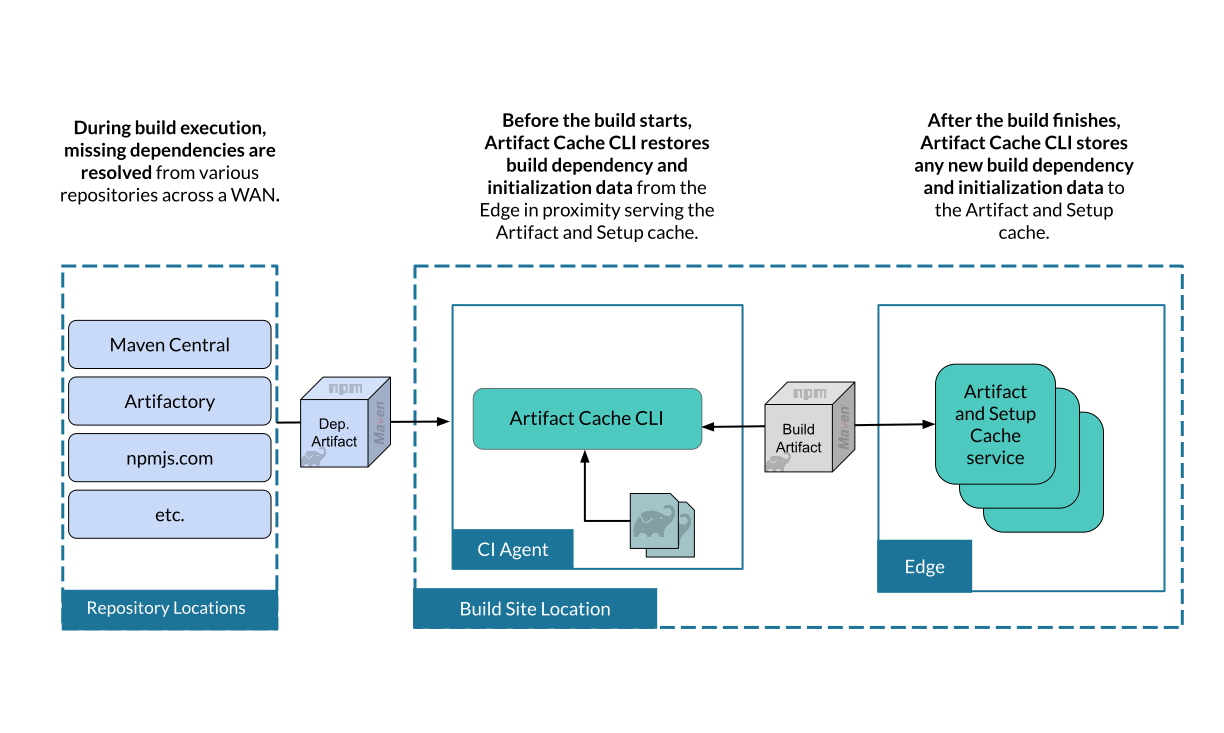
Artifact Cache CLI stores and restores build artifacts to the Develocity Artifact Cache and Setup Cache service on Develocity Edge nodes through three sequential phases: Restore, Build, and Store. Edge nodes manage the available cache storage through an eviction policy, and Develocity manages access control for Artifact Cache CLI clients.
Hosting the Artifact Cache CLI Binary
| You must host the Artifact Cache CLI binary within your internal network. This is required for security and reliability. |
Download the CLI binary and upload it to your internal artifact repository (such as Artifactory, Nexus, or a simple file server). This approach ensures:
-
Control over artifact availability
-
Compliance with corporate security policies
-
Optimal download speeds
Download
You can download the latest version of develocity-artifact-cache-cli JAR file and its associated files from the following links:
curl -L -o develocity-artifact-cache-cli.jar https://docs.develocity.ai/downloads/develocity-artifact-cache-cli/develocity-artifact-cache-cli-1.3.0.jarTo validate the binary:
-
Download the checksum file:
curl -L -o develocity-artifact-cache-cli-1.3.0.jar.sha256 https://docs.develocity.ai/downloads/develocity-artifact-cache-cli/develocity-artifact-cache-cli-1.3.0.jar.sha256 -
Validate the binary against the checksum file:
echo "$(cat develocity-artifact-cache-cli-1.3.0.jar.sha256) develocity-artifact-cache-cli.jar" | sha256sum --check -
If valid, the output is:
Outputdevelocity-artifact-cache-cli: OK
-
If the check fails,
sha256exits with nonzero status and prints output similar to:Outputdevelocity-artifact-cache-cli: FAILED sha256sum: WARNING: 1 computed checksum did NOT match
Download the same version of the binary and checksum.
Verifying the GPG Signature
The develocity-artifact-cache-cli JAR is published alongside its PGP signature.
The public key is published to https://keyserver.ubuntu.com.
You can verify the signature as follows:
curl -OL https://docs.develocity.ai/downloads/develocity-artifact-cache-cli/develocity-artifact-cache-cli-1.3.0.jar && \
  curl -OL https://docs.develocity.ai/downloads/develocity-artifact-cache-cli/develocity-artifact-cache-cli-1.3.0.jar.asc && \
  gpg --keyserver keyserver.ubuntu.com --recv-key 7B79ADD11F8A779FE90FD3D0893A028475557671 && \
  gpg --verify develocity-artifact-cache-cli-1.3.0.jar.asc develocity-artifact-cache-cli-1.3.0.jar
The output of the last command should look similar to the following:
gpg: Signature made Mon Jun  8 09:47:52 2026 UTC
gpg:                using RSA key 893A028475557671
gpg: Good signature from "Gradle Inc. <[email protected]>" [unknown]
gpg: WARNING: This key has been revoked by its owner!
gpg:          This could mean that the signature is forged.
gpg: reason for revocation: Key is superseded
gpg: WARNING: This key is not certified with a trusted signature!
gpg:          There is no indication that the signature belongs to the owner.
Primary key fingerprint: 7B79 ADD1 1F8A 779F E90F  D3D0 893A 0284 7555 7671
This verifies that the artifact was signed with the private key that corresponds to the imported public key.
The warning is emitted because you haven’t explicitly trusted the imported key (therefore [unknown]).
One way of establishing trust is to verify the fingerprint over a secure channel.
Please contact technical support should you want to do so.
|
This key was superseded by a new Develocity signing key, so |
Requirements
For system requirements to use Develocity Artifact Cache and Setup Cache, see System Requirements.
Getting Started
See Configuring GitHub Actions and Configuring Jenkins to get started on a specific CI platform.
Artifact Cache CLI Commands
Refer to the Artifact Cache CLI Commands Reference for detailed information on available commands and their usage.
Develocity Artifact Cache and Setup Cache Operation Flow
Artifact Cache CLI connects to a Develocity Edge node and runs three sequential phases for each CI job.
Edge Discovery
The Artifact Cache CLI uses Edge discovery to connect to the optimal Edge:
-
Artifact Cache CLI reads the access key of a CI agent Develocity user from the environment variable
DEVELOCITY_ACCESS_KEY. -
Access key identifies a Develocity user.
-
The CI agent Develocity user has the Edge location configured.
-
Artifact Cache CLI connects exclusively to that Edge for the Restore and Store phases.
Alternatively, use the --dv-edge option to connect directly to a specific Edge node, bypassing automatic discovery.
Restore Phase
-
CI job starts: A fresh ephemeral CI agent is created.
-
Checkout code: The repository is cloned.
-
Artifact Cache CLI queries Edge: Requests the image for this job/branch.
-
Edge returns image: Lists all known artifacts for this job.
-
Restore artifacts: Artifact Cache CLI downloads artifacts.
| If an existing caching solution is leveraged by the ephemeral CI agent, be aware that it might clash with Artifact Cache and/or Setup Cache, potentially causing suboptimal caching performance or undefined behavior. |
| The checkout step must be performed before the restore command. |
Store Phase
-
Build completes: The build tool process exits.
-
Artifact Cache CLI scans directories: Identifies new or changed artifacts.
-
Store new artifacts: Uploads to the Edge node.
-
Update image: Records the up-to-date artifact list.
-
Image stored to Edge: The updated image is ready for use by the next CI job.
Observability
Build Scan Reporting
The Common Custom User Data Gradle plugin (version 2.1.0 or above) and Common Custom User Data Maven extension automatically add Artifact Cache and Setup Cache configuration and restore phase metrics to every Build Scan as Custom Values.
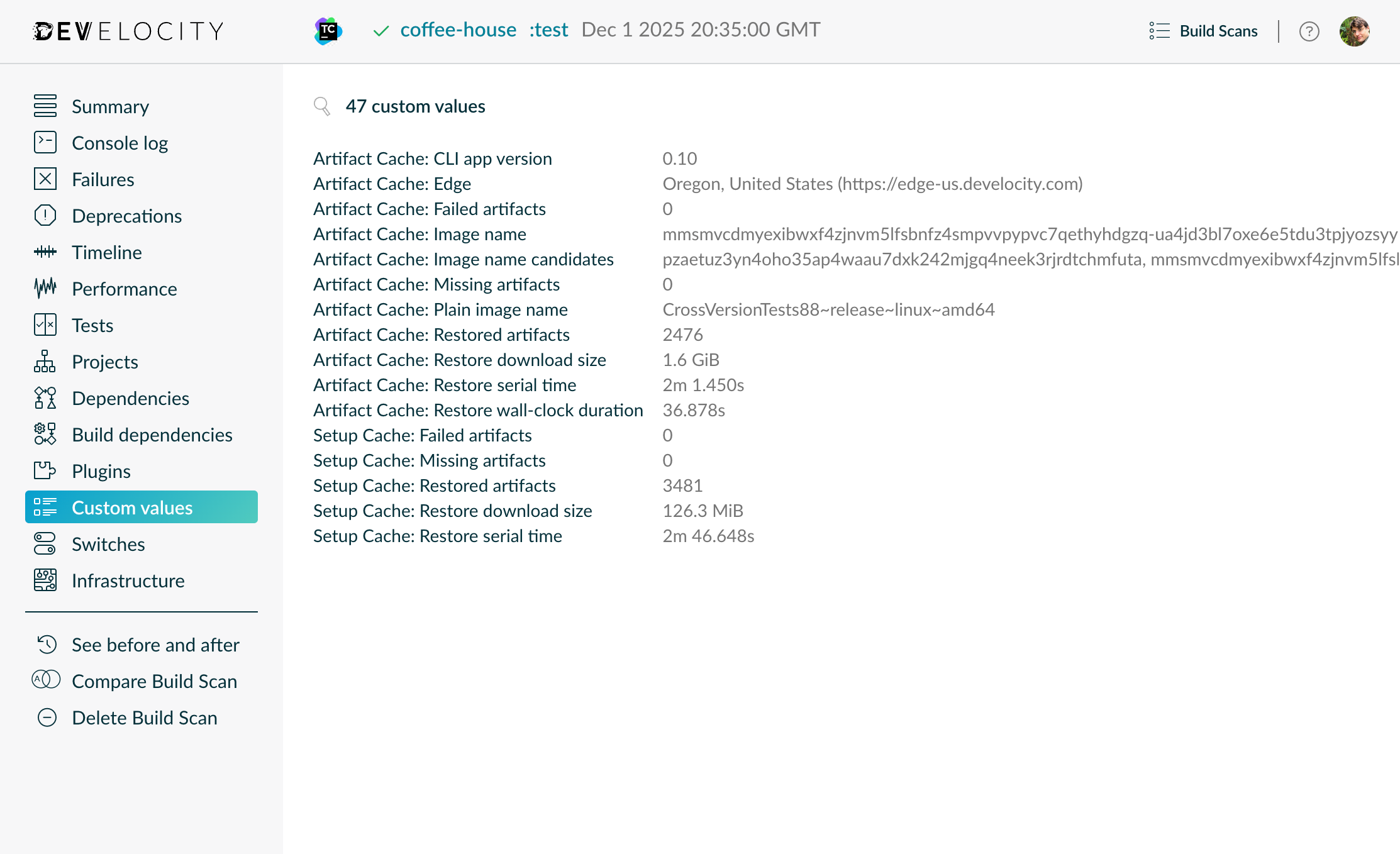
| The "Artifact Cache: Restore wall-clock duration" value is the total duration of the restore phase from both the Artifact Cache and Setup Cache. |
Develocity Reporting and Visualization
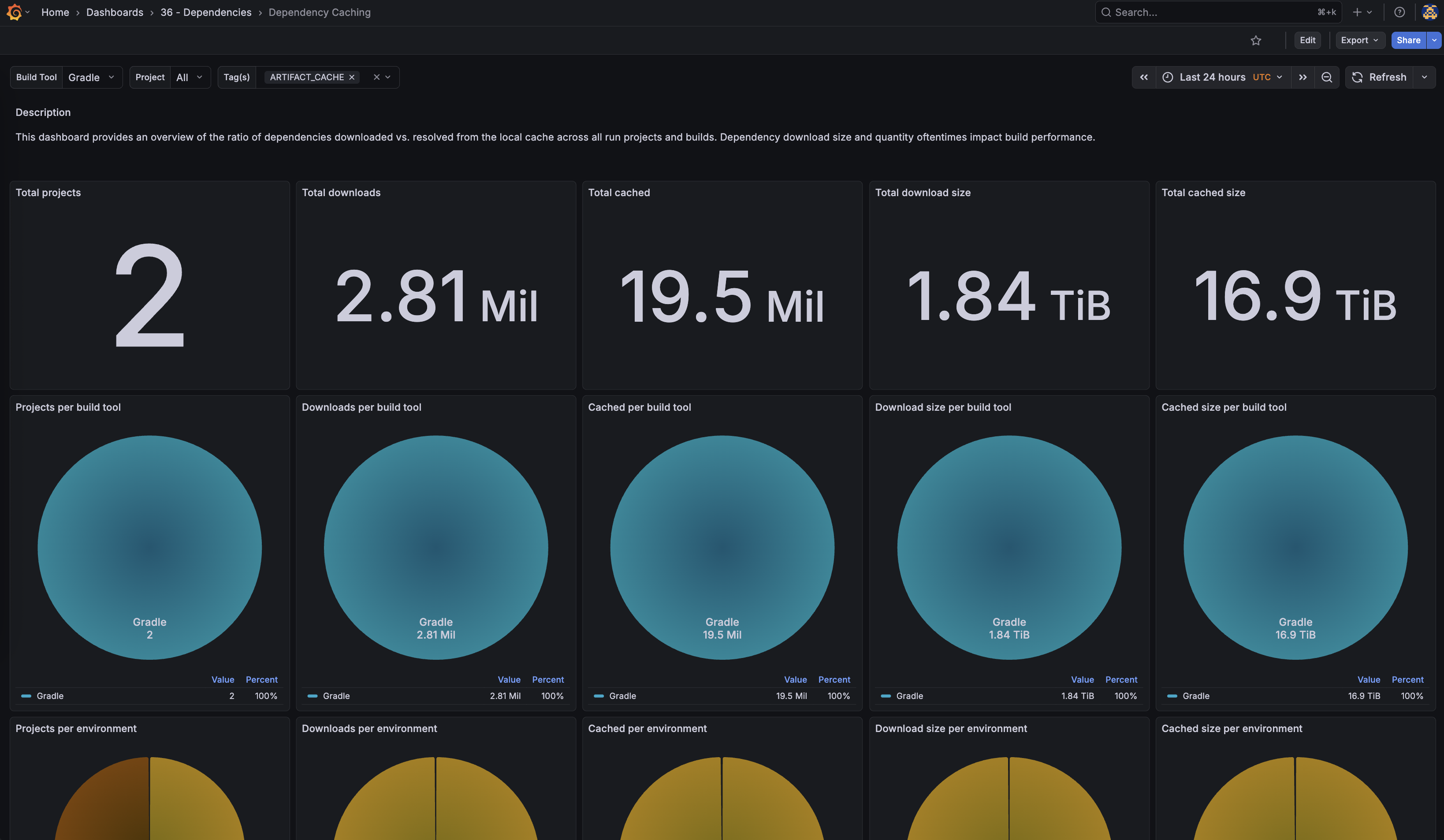
The "Dependency Caching" dashboard in Develocity Reporting and Visualization provides an overview of the ratio of dependencies downloaded compared to resolved from the local cache, across all projects and builds. The dashboard supports Gradle and Maven builds running locally and on CI, and detects cached dependency files regardless of the caching solution used. When Artifact Cache is enabled, the visualizations display the actual reduction in dependency downloads achieved by the feature. The dashboard includes filters by build tool, project, and tags to enable in-depth analysis of caching performance.
|
The "Dependency Caching" dashboard requires Develocity 2026.1 and Develocity Gradle plugin 4.4.0 or Develocity Maven extension 2.4.0. |
Develocity Artifact Cache and Setup Cache Service Monitoring
The Develocity Artifact Cache and Setup Cache service exposed by Edge nodes can be monitored by following the Monitoring section of the Develocity Edge User Manual.