Reduce the Impact of Repository Instabilities
Identify the upstream repository behind a spike in failed downloads, separate the kinds of failure it produces, and read how much of its traffic Develocity Artifact Cache already absorbs.
A repository is unstable when resolving dependencies from it produces inconsistent or unpredictable download outcomes. Instability slows builds even when they ultimately succeed, and in the worst case fails them. Every dependency the cache serves is a request that never reaches the repository, so the cache reduces both the request volume and the exposure to repository instabilities.
Prerequisites
-
Develocity 2026.2 or later
-
Develocity Gradle plugin 3.19 or later, or Develocity Maven extension 1.9 or later
-
The Common Custom User Data Gradle plugin 2.1.0 or later, or the Common Custom User Data Maven extension
-
A Develocity Reporting Kit deployment with dashboard bundle 2.3 or later
Investigate the Spike in Download Failures
Start from the symptom, which is a rise in download failures or download time.
-
Open the "Repository Stability" dashboard in Develocity Reporting and Visualization, and set the relevant filters to inspect the builds you are most interested in. The dashboard consumes download failures reported by your build tools and applies smart grouping and filtering to help you quickly identify the source of instabilities.
-
Inspect the "Trends" charts to detect the spike in download failures.
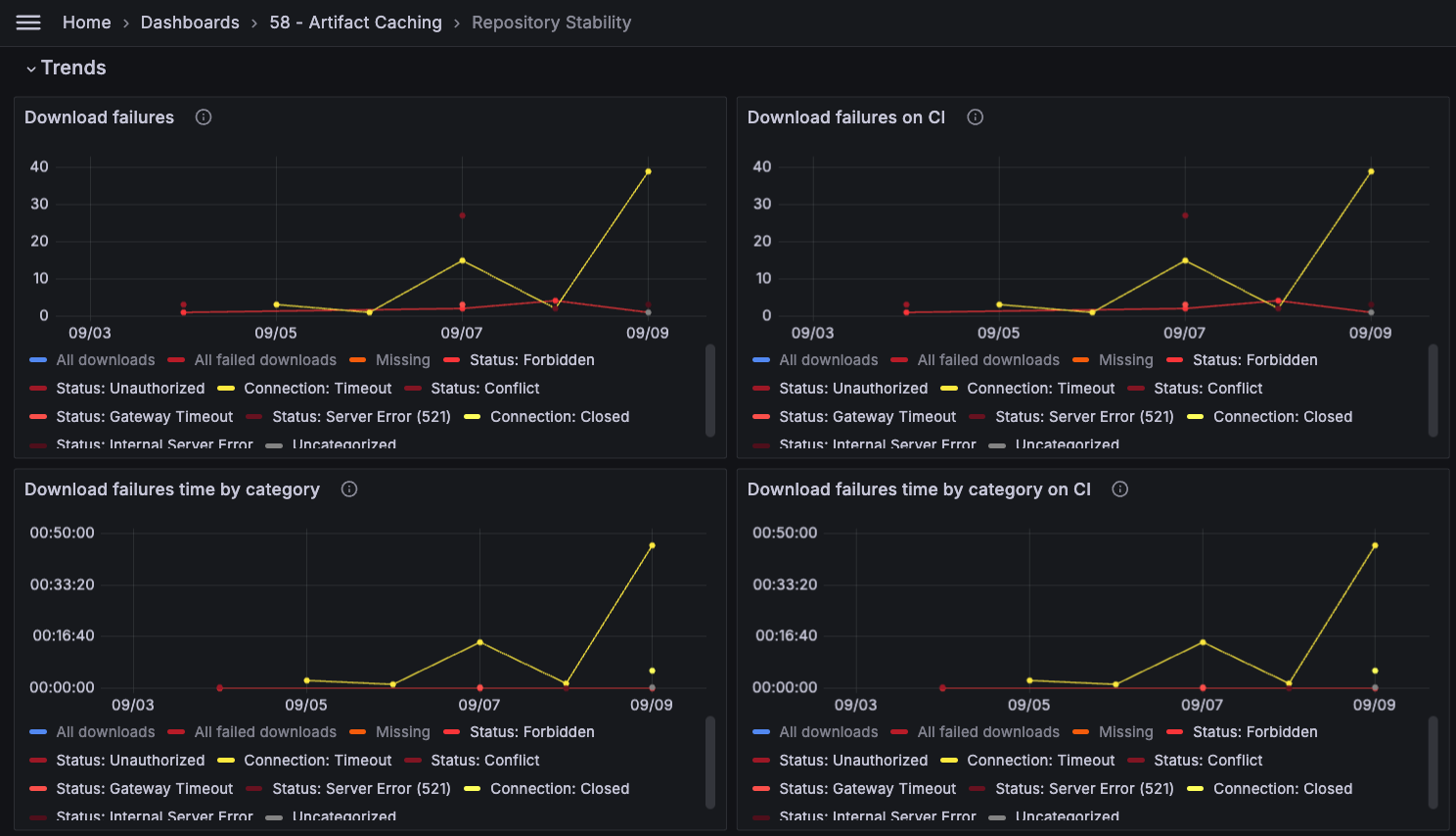 Download failures trend across the selected builds
-
Reading: "Connection: Timeout" failures jump from single digits to 39 on the 9th of September, the largest movement on the chart. They cost roughly 45 minutes of serial time on CI over the same period.
-
-
Next, inspect the "Details per repository and failure category" to identify the repository contributing the most to the spike in download failures.
 Repositories contributing the most to the spike in download failures
-
Reading: The "https://repo.example.com/artifactory/maven-central/" repository accounts for the majority of the timeouts, at 46 builds against 3 or fewer for every other repository.
-
-
One of the common reasons behind "Connection: Timeout" errors is an increased load on the repository server. Confirm this assumption by filtering the overall download volume by the repository in question.
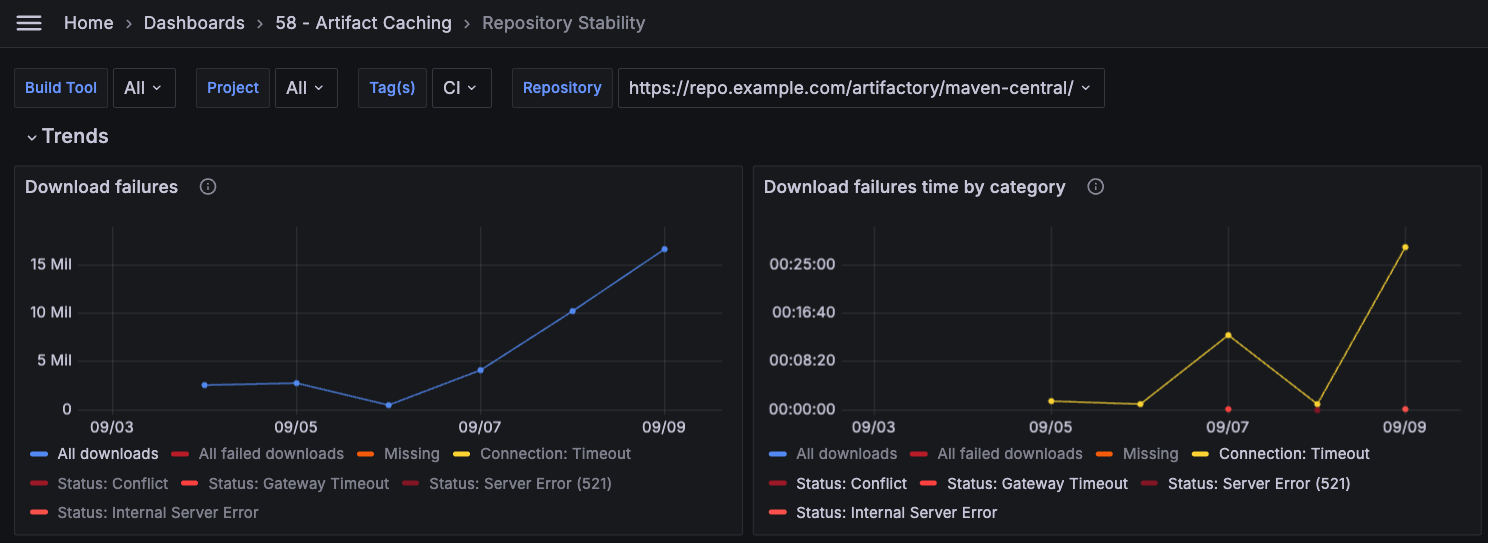 Total download volume from unstable repository
-
Reading: The repository identified in the previous step shows a marked increase in download volume over the same period as the spike in failures, rising from around 2.5 million to over 15 million requests.
-
-
Artifact Cache is able to reduce the load on your upstream repository by serving cached artifacts, which prevents repeated requests from reaching the repository during periods of high load or instability. Apply the ARTIFACT_CACHE tag filter to confirm that the cache is indeed serving artifacts for the unstable repository.
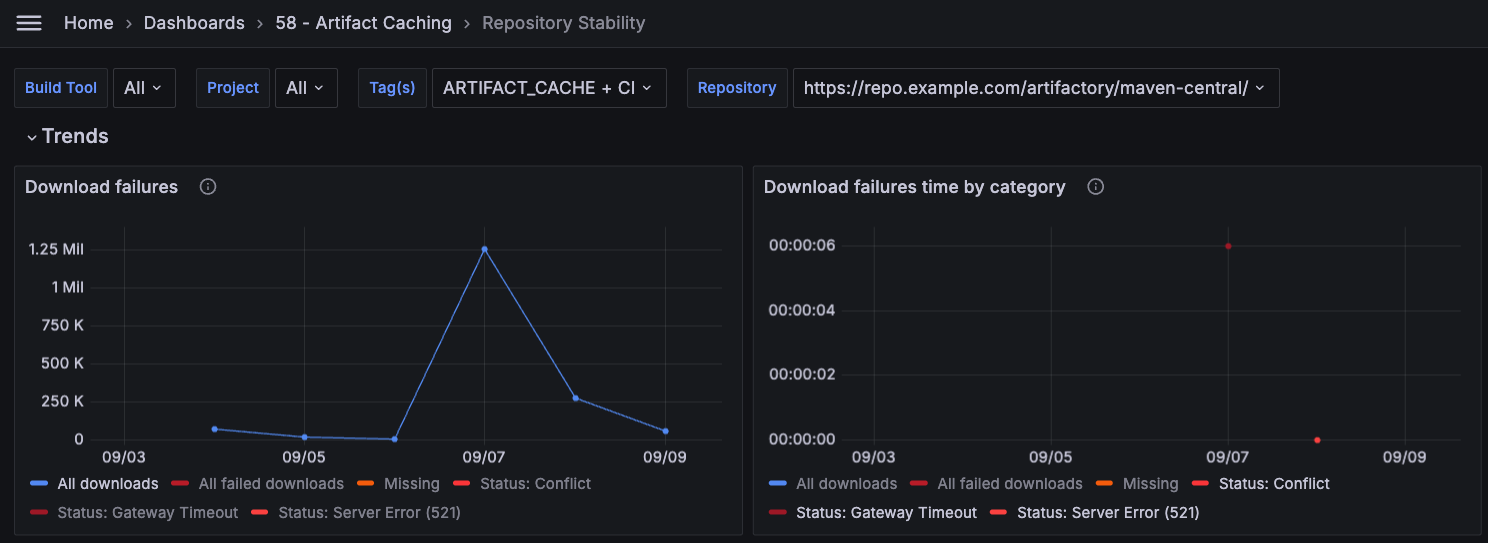 Reduced download volume from unstable repository
-
Reading: In builds with Artifact Cache enabled, the repository served a small fraction of the download requests and recorded no "Connection: Timeout" failures.
-
Next Steps
-
Ask the same question through an AI client. The Develocity Analytics MCP Server reads the same repository instability data, so a prompt such as Which repositories accumulated the most download failures last week? returns the ranking without opening a dashboard.
-
Create custom reports by programmatically accessing the repository stability data via the
gradle-repository-instabilitiesandmaven-repository-instabilitiesDevelocity APIs. -
Understand why the cache was not effective in the builds where the repository still saw high load or failures, by working through Measure the Effectiveness of Artifact Cache.
-
Check what served a specific dependency with Trace the Origin of a Dependency.