Trace the Origin of a Dependency
For any dependency in any build, you can name what served it: Develocity Artifact Cache, another cache, or a repository the build downloaded it from. When Develocity Artifact Cache served it, you also learn which Edge location handed it over.
Prerequisites
-
Develocity 2026.3 or later
-
Develocity Gradle plugin 4.6.0 or later, or Develocity Maven extension 2.6.0 or later
-
The Common Custom User Data Gradle plugin 2.1.0 or later, or the Common Custom User Data Maven extension
-
A Develocity Reporting Kit deployment with dashboard bundle 2.4 or later
Trace One Dependency in One Build
Start from the build you have a question about.
-
Open the Build Scan of the build and go to the Dependencies section.
-
Find the dependency and select it to open the dependency details inspector.
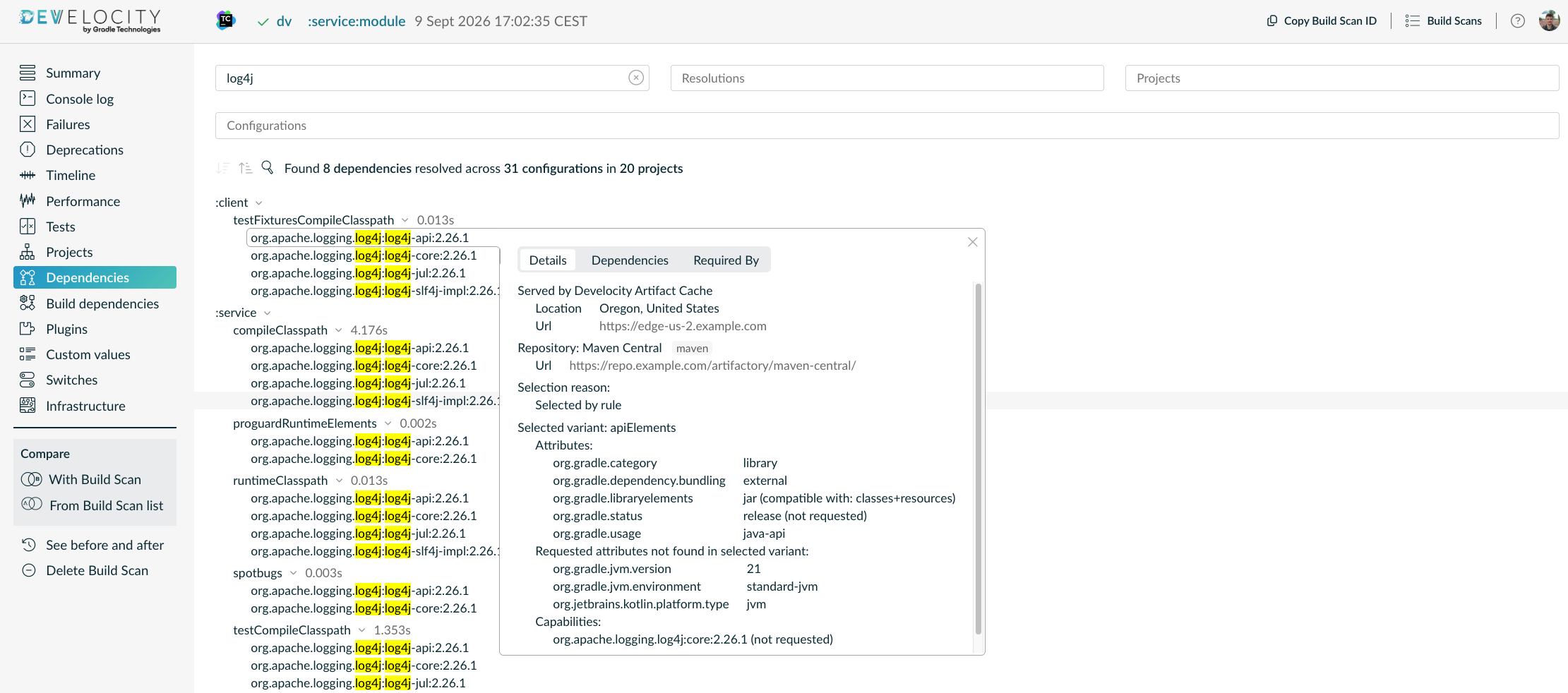 The Edge location that served the dependency
-
Reading: The details inspector shows whether the dependency was served by Develocity Artifact Cache, and from which Edge location and node. No Served by entry means the build downloaded the dependency or it was served by an unknown cache. The Repository entry below it shows which repository provides the dependency, regardless of whether it was served by a cache or downloaded directly.
-
Trace Dependency Origin Across Builds
The JVM Dependencies dashboard answers the same question across a wide range of builds and dependencies.
-
Open the JVM Dependencies dashboard in Develocity Reporting and Visualization, and set the relevant filters to inspect the builds you are most interested in.
-
Select the dependency you want to trace the origin for and scroll down to the "Details per origin" table.
 Origin split for the selected dependency
-
Reading: A remote repository served the selected dependencies in 13.2 K builds, while Develocity Artifact Cache served them in 35.9 K and 221 builds across two Edge locations, making the cache the majority origin. The dashboard also identifies that other types of caches, such as GitHub Actions Cache or local pre-baked agent caches, served the dependency. Dependencies resolved by builds that don’t satisfy the plugin and extension prerequisites described above appear as coming from an "Unknown" origin in the dashboard.
-
-
To trace the origin of each dependency version, either specify the "Version" filter or expand the "Details per versioned dependency" table.
 Origin split per dependency version
-
Reading: The table aggregates all origins that provided the selected dependency version across the inspected builds. The "org.apache.logging.log4j:log4j-slf4j-impl:2.25.4" version was used briefly, by 7 CI builds, and only a remote repository served it. The superseding 2.25.5 patch reached 2.47 K builds, and its origins include an Edge location, so the cache served it alongside the repository.
-
Next Steps
-
Ask the same question through an AI client. The Develocity Analytics MCP Server reads the same dependency data, including the origin of each dependency, so a prompt such as Which dependencies did an unknown cache serve across the fleet last week? returns the fleet-wide answer without opening a dashboard.
-
Create custom reports by programmatically accessing the dependency origin via the
gradle-dependenciesandmaven-dependenciesDevelocity APIs. -
Measure what Develocity Artifact Cache saves overall with Measure the Effectiveness of Artifact Cache.
-
Reduce what the remaining downloads cost you by working through Reduce the Impact of Repository Instabilities.