Develocity Flaky Test Detection Guide
Configure test retry for Gradle, Maven, sbt, Bazel, npm, or Python to enable within-build flaky test detection. For an overview of how Develocity detects flaky tests, see Flaky Test Detection.
How Flaky Test Detection Works
Develocity identifies flaky tests in a single build and across multiple builds.
For a single build, a test outcome is marked as FLAKY if it fails and succeeds within the execution of a single Gradle task, Maven goal, Bazel target, sbt task, or npm or Python test process.
When this occurs, flaky tests analysis becomes available in the Build Scan and in the Develocity Tests Dashboard.
For Python, FLAKY outcomes appear in the Build Scan only, not in the Tests Dashboard.
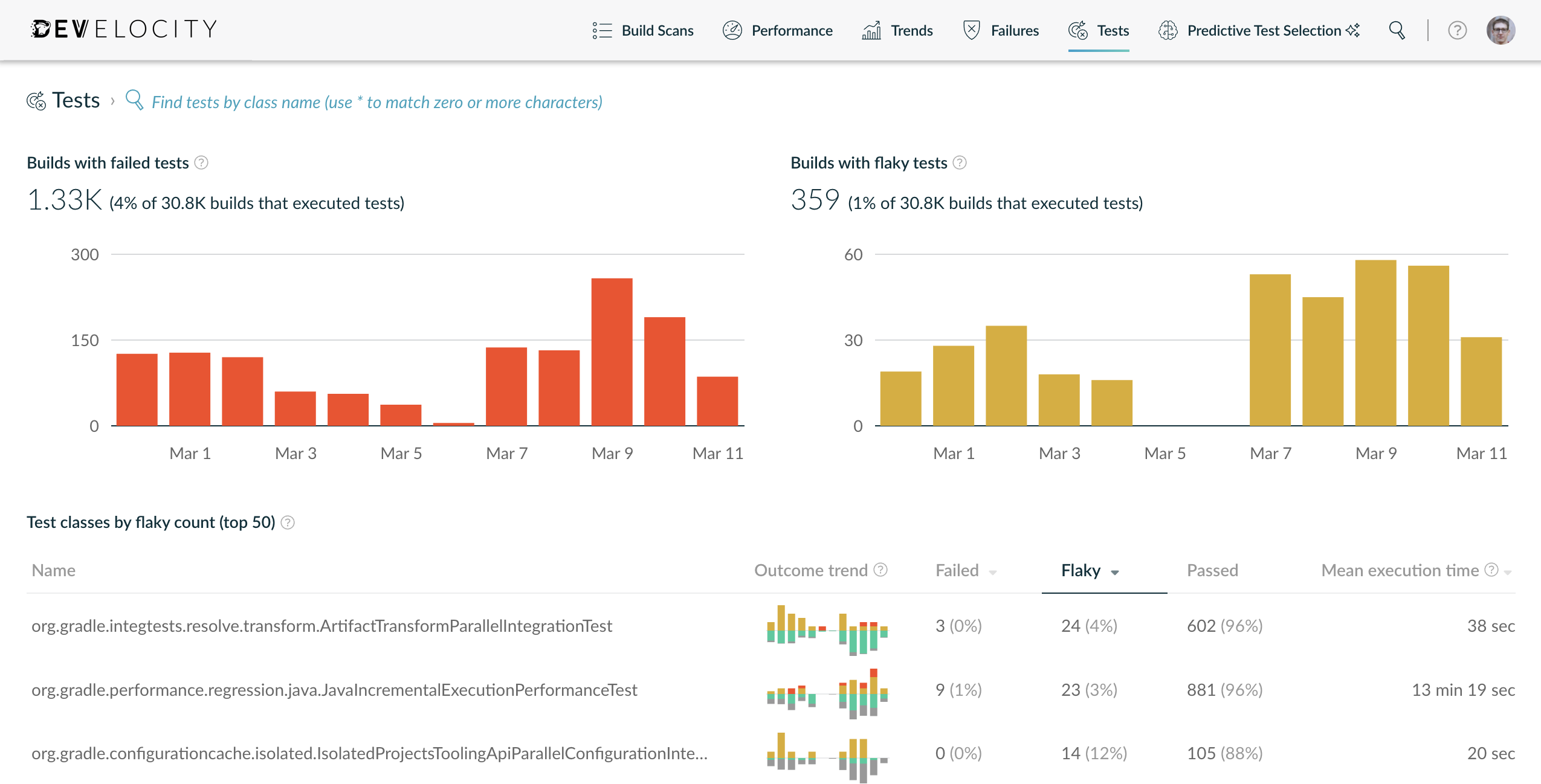
This typically requires retrying failed tests, which is an industry-standard way to identify flaky tests. When a test is retried, the Build Scan captures the test output from all failed executions and the first successful execution for comparison.
Flaky Test Detection Setup
Common test execution frameworks such as JUnit provide mechanisms for retrying tests, typically requiring extra code to annotate tests that are known to be flaky.
However, enabling test retry via your build doesn’t require source code changes and applies to your entire test suite. Importantly, this allows you to analyze newly-introduced flaky tests in the Develocity Tests Dashboard.
One other important aspect to consider is whether to fail the build when flaky tests are encountered. Historically, retry mechanisms have allowed builds to succeed. When enabling test retry through Gradle or sbt, it’s possible to enable flaky test detection without silencing flaky failures. This comes at the cost of continuing developer disruptions, however; and should be considered carefully.
Gradle
| The configuration examples in this section assume you are using Develocity Gradle plugin 3.17 or later. For older versions, refer to the (Legacy) Gradle Enterprise Gradle Plugin User Manual. |
The Develocity Gradle plugin version 3.12 or above integrates the test retry functionality offered by the Test Retry Gradle plugin.
-
Kotlin
-
Groovy
tasks.withType<Test>().configureEach {
    develocity.testRetry {
        if (System.getenv().containsKey("CI")) {
            maxRetries.set(3)
        }
        failOnPassedAfterRetry.set(true)
    }
}tasks.named('test', Test) {
develocity.testRetry {
if (System.getenv().containsKey("CI")) {
maxRetries = 3
}
failOnPassedAfterRetry = true
}
}See test retry functionality in Develocity documentation to learn about all the useful features and configuration options.
When using an older version of the Develocity Gradle plugin, you can use the test retry functionality of the test retry plugin version 1.1.4 or above.
-
Kotlin
-
Groovy
plugins {
    id("org.gradle.test-retry") version "1.6.6" (1)
}

tasks.withType<Test>().configureEach {
    retry {
        if (System.getenv().containsKey("CI")) {
            maxRetries.set(3)
        }
        failOnPassedAfterRetry.set(true)
    }
}plugins {
id('org.gradle.test-retry') version '1.6.6' (1)
}
tasks.named('test', Test) {
retry {
if (System.getenv().containsKey("CI")) {
maxRetries = 3
}
failOnPassedAfterRetry = true
}
}See the Test Retry Gradle plugin documentation and introductory blog post to learn about all the useful features and configuration options.
Compatibility
The test retry functionality provided by the Develocity Gradle plugin is available from version 3.12 onwards, and requires Gradle 5.0 or newer.
The test retry functionality is currently supported by the following frameworks (other versions are likely to work as well, but haven’t been explicitly tested):
-
JUnit4: 4.13.2
-
JUnit5: 5.9.2
-
Spock: 2.3-groovy-3.0
-
TestNG: 7.5
Maven
The Maven Surefire and Failsafe plugins provide configuration properties which cause the test runner to retry each failing test a configured number of times.
Configuring these properties in your project causes failing tests to be rerun immediately after they fail.
If a test passes and then fails, Develocity will record a FLAKY outcome for the test.
<properties>
    <failsafe.rerunFailingTestsCount>2</failsafe.rerunFailingTestsCount>
    <surefire.rerunFailingTestsCount>2</surefire.rerunFailingTestsCount>
</properties>| Test retry works the same way when using Test Distribution with the Develocity Maven Extension. |
See the maven-surefire-plugin documentation and maven-failsafe-plugin documentation for configuration details.
Bazel
Bazel provides a common flaky attribute to test rules which causes Bazel to rerun failing tests up to three times, equivalent to specifying --flaky_test_attempts=3 for test runs.
If any subsequent test execution passes after a failure, the test is marked as FLAKY, and the test target may succeed.
java_test(
    name = "foo",
    flaky = True
)
See the Bazel user manual for more information.
sbt
The Develocity sbt plugin version 1.0 or above supports test retry.
ThisBuild / develocityConfiguration ~= { previous =>
  previous
    .withTestRetry(
      previous.testRetry
        .withMaxRetries(if (sys.env.contains("CI")) 3 else 0)
        .withFlakyTestPolicy(FlakyTestPolicy.Fail)
    )
}
See the section Using Test Retry in the Develocity sbt plugin user manual to learn about all the useful features and configuration options.
npm
The Develocity npm agent supports detecting flaky tests for
a selection of test runners,
based on their native test retry mechanism.
When enabled, failing tests will be re-executed until they pass or retry limit is reached.
In case a test failure is followed by success a FLAKY test status will be assigned and visible in the Build Scan.
Python
The Develocity Python agent (beta) detects flaky tests through the pytest-retry plugin.
Install pytest-retry and run pytest with the --retries option:
pip install pytest-retry
pytest --retries=2
When a test fails and then passes on a subsequent attempt, the agent records a FLAKY outcome, visible in the Build Scan.
The rerun count is controlled by the --retries option of pytest-retry, not by the Develocity agent.
Flaky test detection for Python is available for pytest only.
See Viewing Test Results in the Develocity Python agent user manual for details on how flaky outcomes appear in the Build Scan.
Resources for Flaky Test Analysis
With flaky test detection enabled, you will be able to identify the most severe flaky tests and their trends using Develocity Test Failure Analytics.
Here are some resources which show you how to best leverage these tools:
-
Preventing Flaky Tests from Ruining your Test Suite: more on flaky test detection, common sources of flakiness, flaky test management strategies
-
Flaky Test Management with Develocity: a real-world example debugging a flaky test in Gradle using Develocity
-
"Flaky Test Days" primer: how Gradle engineering uses "Flaky Test Days" to manage flaky tests
-
Develocity API samples: example how to automate flaky test management using Develocity API
If you have any questions or need any assistance contact the Develocity support team or your customer success representative.