Develocity Docker Agent User Manual
The Develocity Docker agent publishes a Build Scan to your Develocity instance for every image build performed by an observed Docker builder.
|
Docker support is not enabled by default. To enable it, contact Develocity support. |
The agent is a long-running daemon that runs alongside your Docker builder, on the same host where you run docker buildx build.
It subscribes to the builder’s BuildKit build history and captures each image build from the outside, so it requires no change to your Dockerfiles, build commands, or CI scripts.
This makes it different from the other Develocity build agents, which hook into the build tool itself.
Installation
|
The agent is distributed as an executable JAR.
-
Download the agent JAR:
curl -OL https://develocity-docker-build-agent.gradle.com/develocity-docker-agent-0.9.0.jarTo verify the download before running it, see the Verifying the Signature of the Agent JAR appendix.
-
Start the agent, pointing it at your Develocity server with the
DEVELOCITY_URLenvironment variable:DEVELOCITY_URL=https://develocity.example.com java -jar develocity-docker-agent-0.9.0.jar -
Wait for the agent to report that it is ready:
Outputsubscribed to BuildKit, waiting for builds
From this point on, every image build performed by the observed builder publishes a Build Scan. The agent logs a confirmation for each one:
scan published: https://develocity.example.com/s/3z475bz247h5g
On a build host, run the agent as a system service (for example, a systemd unit) so it starts with the machine and restarts on failure.
Connecting to Develocity
The agent is configured entirely through environment variables and accepts no command line arguments: passing any argument, including --help, makes it exit with an error.
The DEVELOCITY_URL environment variable is required and holds the URL of your Develocity server, without a path component.
When it’s unset, the agent exits with an error at startup.
When connecting over HTTPS, the server’s TLS certificate must be trusted by the JVM running the agent.
To connect to a server whose certificate isn’t trusted, set the DEVELOCITY_ALLOW_UNTRUSTED_SERVER environment variable to true.
This might be convenient when testing a deployment, but you shouldn’t use it as a long-term solution.
The agent can connect through an HTTP, HTTPS, or SOCKS proxy and can present a client TLS certificate (mutual TLS), both configured through environment variables: see Environment Variables.
Authenticating With Develocity
Develocity installations may be configured to require Build Scan publishing to be authenticated. Additionally, installations may be configured to only allow certain users to publish Build Scan records.
|
Develocity access keys should be treated with the same secrecy as passwords. They’re used to authorize access to Develocity from a build. |
To create an access key:
-
Sign in to Develocity.
-
Access "My settings" from the user menu in the top right-hand corner of the page.
-
Access "Access keys" from the left-hand menu.
-
Click "Generate" on the right-hand side and copy the generated access key.
The access key is specified via the DEVELOCITY_ACCESS_KEY environment variable of the agent process.
The environment variable value format is «server host name»=«access key».
export DEVELOCITY_URL=https://develocity.example.com && \
  export DEVELOCITY_ACCESS_KEY=develocity.example.com=7w5kbqqjea4vonghohvuyra5bnvszop4asbqee3m3sm6dbjdudtq && \
  java -jar develocity-docker-agent-0.9.0.jar
The server host name is specified in order to prevent the access key being transmitted to a different server than intended. If the variable contains no entry for the server host, the agent logs a warning at startup and publishes without authentication.
How the Agent Observes Builds
The agent observes the builder that is currently selected for the Docker CLI environment it runs in, as reported by docker buildx inspect.
It works with the default docker driver as well as with docker-container, kubernetes, and remote builders, provided the builder’s BuildKit version is supported (see Compatibility With Docker).
The agent only captures builds it observes from start to finish. Builds whose BuildKit history record was created before the agent started are skipped, including builds already in progress at startup. Builds that complete while the agent isn’t running are skipped as well: the agent keeps no persistent state and doesn’t publish Build Scan records retroactively. Start the agent before the builds you want captured.
If the Docker daemon is unavailable when the agent starts, or becomes unavailable while it runs, the agent keeps retrying and resumes capturing builds once the daemon is reachable again. An unsupported Docker Engine, Docker Buildx, or BuildKit version is different: the agent exits with an error that names the requirement instead of retrying (see Compatibility With Docker).
Stopping the Agent
On SIGTERM or SIGINT, the agent finishes the build it’s already processing before exiting, so a Build Scan isn’t lost to a routine restart.
It waits at most 30 seconds by default, configurable through the DEVELOCITY_DOCKER_AGENT_SHUTDOWN_GRACE_PERIOD_SECONDS environment variable (see Environment Variables).
When package scanning is enabled, processing a build can take longer than the default grace period (see Package Scanning). Raise the grace period together with the stop timeout of the service manager or container runtime that runs the agent, otherwise the process is killed before it finishes.
Extending Build Scan
Because the agent observes builds from the outside, there is no in-build API. Instead, each Build Scan can be enriched by passing specially named build arguments to the image build. The build arguments don’t need to be declared in the Dockerfile.
DEVELOCITY_TAG_«name»-
Adds
«name»as a tag. The tag is added whenever the build argument is present, regardless of its value. DEVELOCITY_VALUE_«key»=«value»-
Adds a custom value with the given key and value.
DEVELOCITY_LINK_«label»=«url»-
Adds a custom link with the given label and URL.
DEVELOCITY_PROJECT_ID=«id»-
Sets the Develocity project the build is associated with and the project name shown in Develocity. It takes precedence over the agent’s
DEVELOCITY_PROJECT_IDenvironment variable (see Environment Variables), which only affects the project association. The value must be non-blank, contain no whitespace, and be at most 256 characters long; an invalid value is ignored with a warning in the agent log, and both the project name and the project association fall back as described below.
Unlike a tag, a custom value or link whose build argument has a blank value (for example, --build-arg DEVELOCITY_VALUE_pipeline=) is ignored.
|
Build argument names can’t contain hyphens, so use underscores in tag names, value keys, and link labels. |
For example:
docker buildx build \
  --build-arg DEVELOCITY_TAG_nightly= \
  --build-arg DEVELOCITY_VALUE_pipeline=release \
  --build-arg DEVELOCITY_LINK_CI_run=https://ci.example.com/runs/1234 \
  --build-arg DEVELOCITY_PROJECT_ID=acme-app \
  -t acme/app .
The project name shown in Develocity is the DEVELOCITY_PROJECT_ID build argument when the build sets a valid one.
Otherwise, it’s the last path segment of the git remote of the build context, with any .git suffix removed, when there is one; otherwise, it’s (N/A).
The agent’s DEVELOCITY_PROJECT_ID environment variable never sets the displayed project name.
If neither the build argument nor the agent’s environment variable is set, the build isn’t associated with any project. The project association is never derived from VCS data.
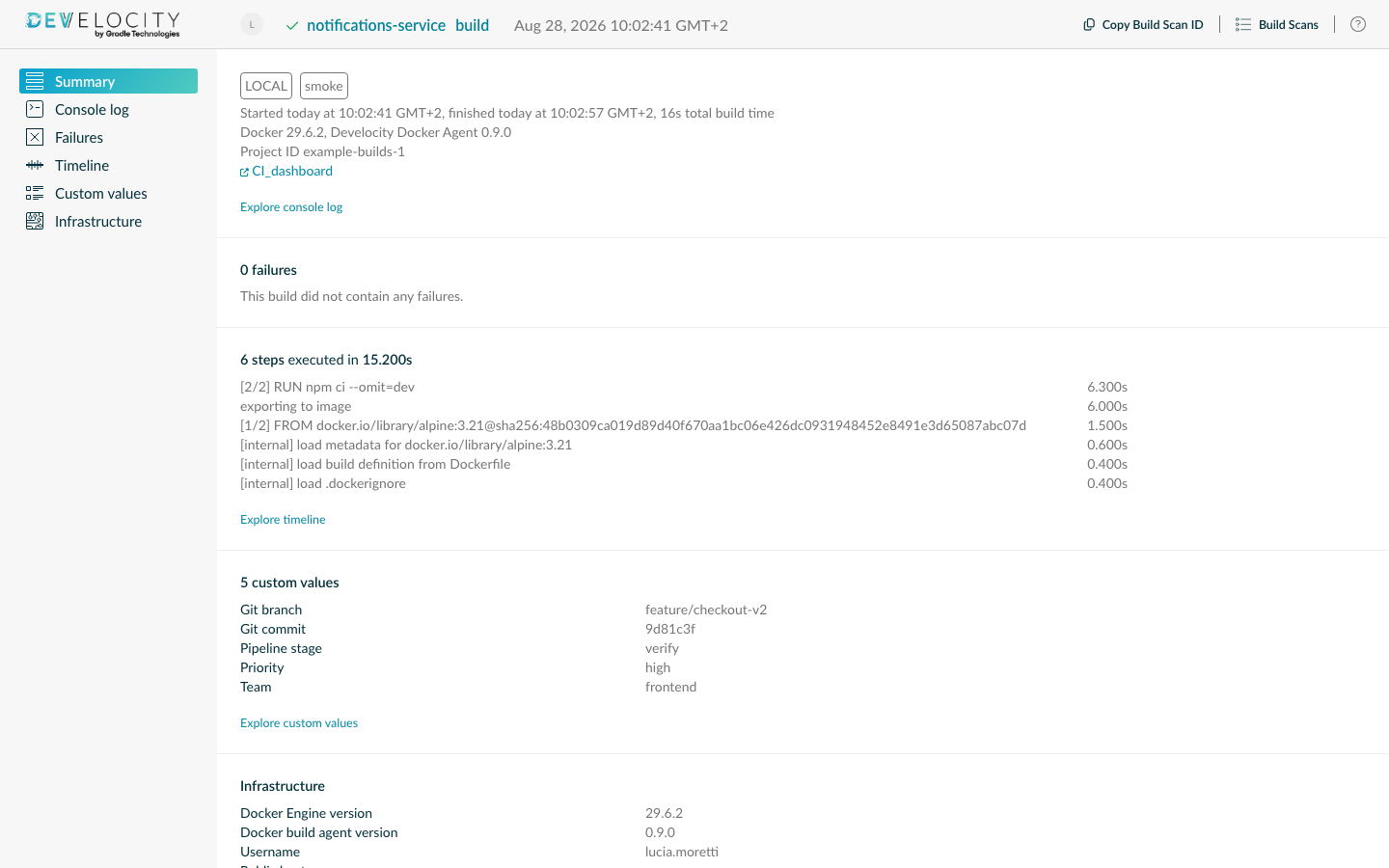
Captured Data
Each Build Scan captures:
-
Build and per-step timing, with each step’s outcome (passed, cached, canceled, or failed) and the build’s critical path highlighted in the timeline
-
The console output of each step
-
Failures, with the failing step, its console output, and the build’s exit code
-
BuildKit warnings, with their Dockerfile source ranges
-
The images the build depends on, resolved from the build’s provenance and classified by role: base images used at runtime, images used only in intermediate build stages, and the Dockerfile syntax frontend
-
The packages inside the produced image, when package scanning is enabled (see Package Scanning)
-
The name of the build and the images it exported
-
VCS information for git build contexts
-
Whether the build ran in CI or locally, and which CI provider ran it (see CI Information)
-
The operating system of the machine that invoked the build, where the agent runs, and of the Docker host that executed it, shown as "Operating system" and "Docker host operating system" respectively. For builders other than the default
dockerdriver, only the Docker host’s operating system family and architecture are known.
Failures are shown in the Build Scan.
BuildKit warnings aren’t shown in the Build Scan: they’re available through the docker-attributes endpoint of the Develocity API and the Develocity MCP Server.
The image dependency and package data is available through the /api/builds/«id»/docker-dependencies and /api/builds/«id»/docker-packages endpoints of the Develocity API, through the Export API, and through the Develocity MCP Server.
Docker builds appear on the Performance, Trends, and Failures dashboards of Develocity. The dashboard bundle 2.4 or later adds the Docker Build Parallelism and Docker Build Caching dashboards, and includes Docker builds on its volume and environment dashboards.
Build Name
Each Build Scan carries one build name, shown in the "Build" column of the Build Scan list and in the Build Scan header, searchable with the docker.buildName field, and used as the requested build in Develocity analytics.
The agent follows the same convention as docker buildx history ls, in this order:
-
The
BUILDKIT_BUILD_NAMEbuild argument, when the build sets one (for example,--build-arg BUILDKIT_BUILD_NAME=api) -
The build context directory, relative to the git repository root (for example,
services/api) -
The directory of the Dockerfile relative to the git repository root, with the file name appended when it isn’t
Dockerfile(for example,deploy/Dockerfile.release) -
The literal
build, when the context is the repository root or isn’t a git checkout
When the build targets a stage with --target, the stage name is appended in parentheses, as in deploy/Dockerfile.release (runtime).
Exported Images
Every image reference the build exported is recorded as an Exported image custom value, also when the build failed.
References are normalized to the fully qualified form BuildKit uses, so -t myapp:1.0 is recorded as docker.io/library/myapp:1.0, then deduplicated, and at most 50 are kept per build.
Search for builds by exported image with a custom value term, such as value:"Exported image=docker.io/library/myapp*".
VCS Information
For a build whose context is a git checkout, the agent records the values Buildx stamps on the build request, following the same naming conventions as the Common Custom User Data Gradle plugin:
Git repository-
The URL of the git remote, as a custom value and, for
httpandhttpsremotes, as a custom link. Git commit id-
The commit identifier, as a custom value. Buildx appends
-dirtywhen the working tree has uncommitted changes. Git branch-
The branch name, as a custom value and as a tag.
The branch is read from the checkout’s HEAD at the context path Buildx reports, and only when that path is absolute.
Buildx reports a relative path for a build of a local directory, so the branch is usually not captured.
Credentials are removed from URLs before they’re recorded: a user:token@ part is stripped from repository URLs and from remote build context URLs.
Of the query parameters of a git URL, only ref, branch, tag, subdir, and checksum are kept, so an access_token parameter is dropped.
A URL that isn’t a git URL loses its whole query.
CI Information
The agent tags every Build Scan with CI or LOCAL, depending on the environment it runs in.
On a recognized CI provider, it also records the provider’s name as the CI provider custom value.
On TeamCity, it additionally adds a TeamCity build custom link to the build that ran the agent.
For other providers, pass the link to the CI run yourself with a DEVELOCITY_LINK_«label» build argument (see Extending Build Scan).
Package Scanning
When package scanning is enabled, after each successful build the agent scans the produced image and records the packages it contains, such as OS packages and language runtime libraries, as a software bill of materials (SBOM). The scan runs Syft in a short-lived container on the same Docker daemon that performed the build.
Package scanning is off by default.
To turn it on, set the DEVELOCITY_DOCKER_PACKAGE_SCAN_ENABLED environment variable to exactly true.
Leaving it unset or empty, or setting it to any other value, including TRUE, leaves scanning off.
Only images loaded into the local Docker daemon are scanned.
A build that only pushes to a registry (--push without --load), a build that produces no image (neither --load nor --push), and a failed build aren’t scanned.
Multi-platform builds are scanned once per platform, which is only possible when the daemon uses the containerd image store.
Each platform is given 60 seconds, and all platforms of one build 150 seconds in total; platforms not scanned in time are recorded without packages.
The scanner container runs without network access: it reaches no registry and no advisory database. Package scanning is best-effort: if a scan fails, the Build Scan is published without package information.
The Syft image is pinned by digest inside the agent.
On hosts that can’t pull from Docker Hub, mirror the image into a reachable registry and point the agent at the mirror with the DEVELOCITY_DOCKER_PACKAGE_SCAN_IMAGE environment variable (see Environment Variables).
The recorded packages are available through the /api/builds/«id»/docker-packages endpoint of the Develocity API, the Export API, and the Develocity MCP Server.
Configuration Reference
The agent has no configuration file: it is configured entirely through environment variables.
Command Line Options
The agent accepts no command line arguments.
Passing any, including --help, makes it exit with an error that says the agent is configured through environment variables only.
Set the server URL with the DEVELOCITY_URL environment variable (see Connecting to Develocity).
Environment Variables
Environment variables are read once, at agent startup. A malformed value causes the agent to exit with an error instead of failing the first publish.
DEVELOCITY_ACCESS_KEY-
A semicolon-separated list of
«host»=«key»pairs. When connecting to«host»,«key»is provided as an authentication token to the configured Develocity server. See Authenticating With Develocity. DEVELOCITY_ALLOW_UNTRUSTED_SERVER-
Allows connecting to an HTTPS Develocity server whose certificate isn’t trusted. This might be convenient when testing a deployment, but in general shouldn’t be used unless absolutely necessary. By default, it’s
false. To take effect, the value must be exactlytrue. DEVELOCITY_DOCKER_AGENT_SHUTDOWN_GRACE_PERIOD_SECONDS-
How long, in whole seconds, the agent waits on
SIGTERMorSIGINTfor the build it’s already processing to finish before exiting. By default, it’s30. The maximum is3600;0abandons the build in progress immediately. A negative, non-numeric, or too large value makes the agent exit with an error at startup. See Stopping the Agent. DEVELOCITY_DOCKER_PACKAGE_SCAN_ENABLED-
Whether the agent scans the images produced by observed builds for packages. By default, it’s
false. To turn package scanning on, the value must be exactlytrue; leaving the variable unset or empty, or setting it to any other value, includingTRUE, leaves scanning off. See Package Scanning. DEVELOCITY_DOCKER_PACKAGE_SCAN_IMAGE-
The image reference of a mirror of the package scanner image, for hosts that can’t pull from Docker Hub. It changes where the scanner image comes from, not whether or how the scan runs. See Package Scanning.
DEVELOCITY_HTTP_PROXY_HOST,DEVELOCITY_HTTPS_PROXY_HOST,DEVELOCITY_SOCKS_PROXY_HOST-
The host of the proxy to connect through, per proxy protocol. Each protocol also supports
_PORT,_USER, and_PASSWORDvariants (for example,DEVELOCITY_HTTPS_PROXY_PORT), and HTTP and HTTPS additionally support_NON_PROXY_HOSTS. The standard JVM proxy system properties are also honored. DEVELOCITY_MTLS_CLIENT_CERT,DEVELOCITY_MTLS_CLIENT_KEY-
Paths to a PEM-encoded client certificate and private key, presented to servers that require mutual TLS. Both must be set for the client identity to take effect.
DEVELOCITY_MTLS_CLIENT_KEY_PASSWORD-
The password of the mutual TLS client private key, when the key is encrypted.
DEVELOCITY_MTLS_CLIENT_CA_CERT-
Path to a PEM-encoded CA certificate used to validate the server certificate when connecting with mutual TLS.
DEVELOCITY_PROJECT_ID-
The Develocity project identifier to associate published builds with. By default, builds aren’t associated with any project. It doesn’t set the project name shown in Develocity. A build’s own
DEVELOCITY_PROJECT_IDbuild argument takes precedence (see Extending Build Scan). The value must be non-blank, contain no whitespace, and be at most 256 characters long; an invalid value makes the agent exit with an error at startup. The documentation at Project-level access control provides detailed information regarding project-level access control. DEVELOCITY_URL-
The URL of the Develocity server to publish Build Scan records to, without a path component. Required: when it’s unset, the agent exits with an error at startup.
Compatibility With Docker
| Requirement | Minimum version |
|---|---|
Docker Engine |
24.0 |
Docker Buildx |
0.13 |
BuildKit (custom builder drivers) |
0.11 |
Docker Engine 24.0 is the first release whose bundled BuildKit exposes the build history API the agent relies on.
When using a docker-container, kubernetes, or remote builder, the builder’s BuildKit version is independent of the engine version and must be 0.11 or later.
When any of these versions is older than the minimum, the agent exits with an error that names the requirement instead of retrying.
The agent runs on Linux (x86-64 and ARM64) and macOS (ARM64), and requires Java 21 or later.
Compatibility With Develocity
The Develocity Docker agent requires Develocity 2026.3 or later, with Docker support enabled for your installation (see the note at the top of this page).
Known Issues and Limitations
-
Builds that complete while the agent isn’t running are not captured.
-
Only image builds are captured; other builder activity isn’t recorded.
-
The git branch is usually not captured for builds of a local directory (see VCS Information).
-
BuildKit warnings aren’t shown in the Build Scan (see Captured Data).
-
Signature-based access key exchange over mutual TLS is not supported.
Appendix A: Verifying the Signature of the Agent JAR
The signature confirming Gradle’s authorship of the agent JAR is available next to the JAR itself. The public key is published to keys.openpgp.org. You can verify the signature as follows:
curl -OL https://develocity-docker-build-agent.gradle.com/develocity-docker-agent-0.9.0.jar && \
  curl -OL https://develocity-docker-build-agent.gradle.com/develocity-docker-agent-0.9.0.jar.asc && \
  gpg --keyserver keys.openpgp.org --recv-key 15D543CA40743FFA47654C16622DE19DC011B9BE && \
  gpg --verify develocity-docker-agent-0.9.0.jar.asc develocity-docker-agent-0.9.0.jar
The output of the last command should look similar to the following:
gpg: Signature made Mon Sep  7 08:05:18 2026 CEST
gpg:                using RSA key D9B2DFBD9F3298BA
gpg: Good signature from "Gradle Inc. <[email protected]>" [unknown]
gpg: WARNING: This key is not certified with a trusted signature!
gpg:          There is no indication that the signature belongs to the owner.
Primary key fingerprint: 15D5 43CA 4074 3FFA 4765  4C16 622D E19D C011 B9BE
     Subkey fingerprint: E287 9931 BCA1 A42E 55F2  D64D D9B2 DFBD 9F32 98BA
This verifies that the artifact was signed with the private key that corresponds to the imported public key.
The warning is emitted because you haven’t explicitly trusted the imported key (therefore [unknown]).
One way of establishing trust is to verify the fingerprint over a secure channel.
Contact Develocity support if you want to do so.
|
This key signs Develocity Docker agent 0.9.0 and every later release.
Develocity artifacts released before 17 August 2026 were signed with the previous key, |