Docker Image Caching
The Artifact Cache CLI keeps the Docker images a CI job uses between runs. The store saves them from Docker into the cache at the end of the job, and the next job’s restore loads them back, so builds, tests and containers start without pulling from a registry.
It’s on by default: any job whose agent has docker on its PATH and a Docker daemon that answers takes part.
| Cached images add to the Edge’s storage, its network traffic and, with replication, Develocity’s object storage, and their layers can exceed the default maximum artifact size. Before upgrading to 1.9, size for them as described in System Requirements. |
| A Docker image is unrelated to an Artifact Cache image. The Artifact Cache image is the metadata file that lists everything a CI job restores, and the Docker images a job used are among the entries it lists. |
At a Glance
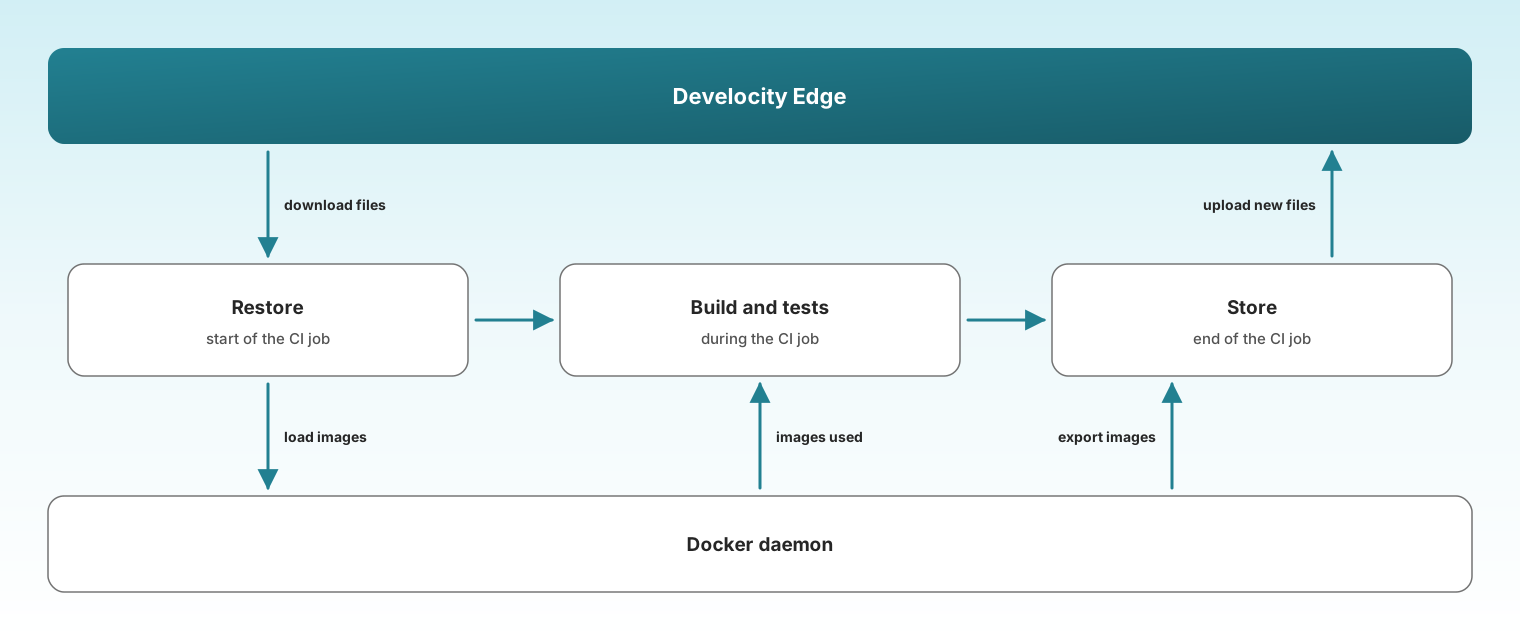
The restore loads cached images into Docker before the job, the job uses them like any local image, and the store saves them back afterwards, uploading only the files the Edge doesn’t hold yet.
What Gets Cached
The store caches the images the job used and leaves out what the job built itself. It finds them in two places:
-
The image store: every image Docker holds at the end of the job, which covers anything tests,
docker runor Docker Compose pulled, including through a library such as Testcontainers. -
The build history: BuildKit’s record of each
docker buildthat ran in the job’s working directory after the restore, which names the base images the build started from. BuildKit resolves a base image without adding it to the image store, so the store pulls a missing one by digest first. That pull goes to the image’s registry, so the credentials the build used must still be valid when the store runs.
It leaves out:
-
Images the job built. The build history says which images a build produced, whether it pushed them or loaded them. They change every run, so caching them would only add upload time. This needs
docker buildx history. Without it, the Artifact Cache CLI can’t tell the job’s own images apart and stores what the image store holds. -
Images tagged
latest, or without a tag. The same name points at a different image over time, so a cached copy could be stale. An image pulled by digest, such aspostgres@sha256:…, has no tag but is cached, because a digest always names the same image. -
Images that match a
--docker-excludepattern. See Excluding Images. -
Restored images the job replaced. The store reads the Docker daemon’s event log for the images the job ran a container from, pulled, pushed or saved. When the job used a new tag or digest of a restored image’s repository, such as a per-build version or a newer base, the old one isn’t carried over. A restored image the job didn’t use is carried over otherwise, so a job that skipped its Docker work, for example on a Build Cache hit, still finds it on the next run. It stays until the next image refresh. The daemon keeps a limited number of recent events, so when its log doesn’t reach back to the restore, every restored image is carried over.
How an Image Is Stored
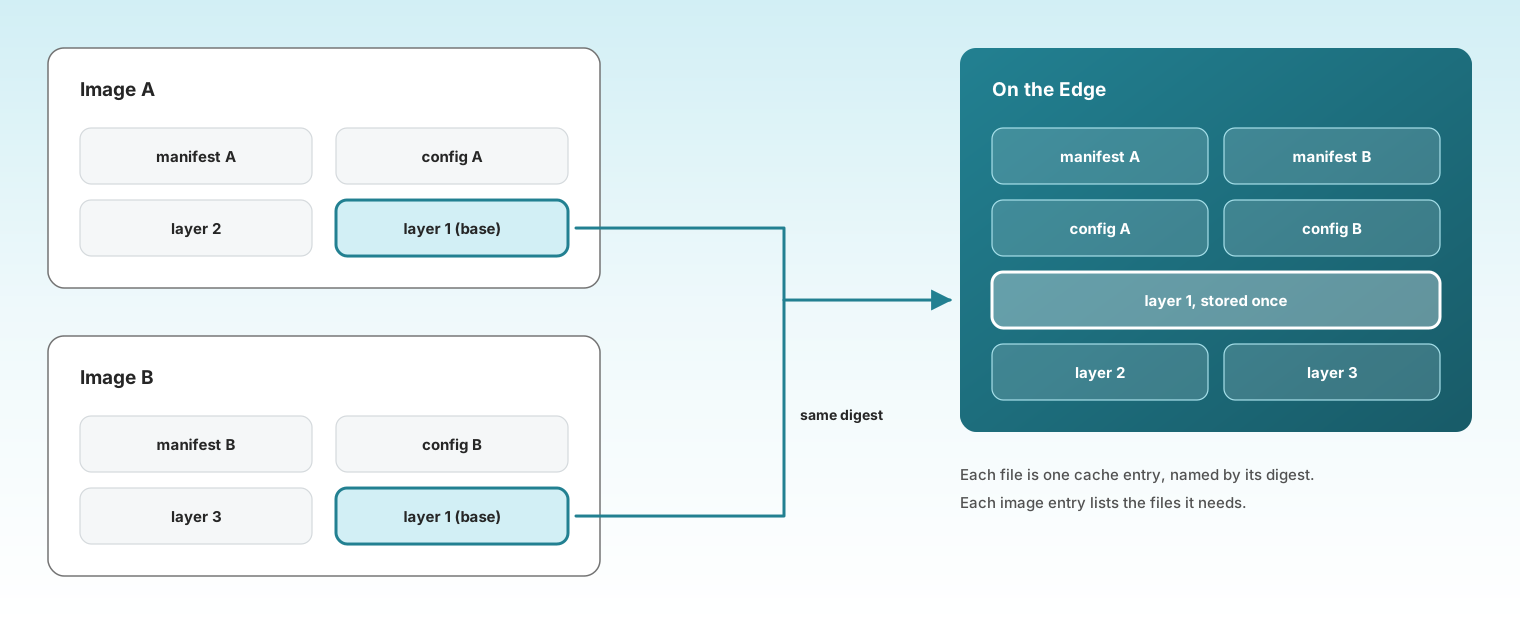
An image isn’t cached as one large file. It’s split into a manifest, a config, and one file per layer, each named by its digest. The store uploads each of these files as an ordinary Artifact Cache entry, and the image’s entry lists the files it needs.
Because files are stored by digest, images that share a layer share one copy on the Edge, and a later store uploads only the files the Edge doesn’t hold yet.
Store, Step by Step
The store runs at the end of the job, after the build and tests.
-
Pick the images, as described in What Gets Cached.
-
Reuse what hasn’t changed. An image that is exactly the one the restore loaded keeps its entry from the last cache without being exported again. On a warm run, that’s most images.
-
Export the rest, smallest first, up to four at a time, within a time limit. An image that doesn’t fit into that time is left for a later run.
-
Upload the files the Edge doesn’t hold yet. Shared layers and unchanged images cost nothing here.
An image that can’t be saved is skipped on its own, and if the Docker daemon doesn’t answer, the store skips Docker altogether. Either way, the job’s other caches are stored as usual.
Restore, Step by Step
The restore runs at the start of the job, before the build.
-
Download each image’s files from the Edge.
-
Check that each image is complete. An image with a missing file, for example a layer the Edge evicted or rejected for its size, is skipped rather than loaded half-built.
-
Load each image into the image store, one at a time, smallest first. Loading counts against the
--timeoutof therestorecommand.
From here on, tests, docker run and Docker Compose find the images locally, and so does a docker build that starts from them.
The job pulls an image that wasn’t loaded from its registry, as it would without the cache.
Like the store, a Docker problem here only skips images: the job’s other caches are restored as usual.
Excluding Images
Some images are pulled by a job but never requested again.
The usual case is an image one pipeline step pushes under a tag unique to the build, such as registry.example.com/team/app:build-1234, and a later step pulls to test against.
Caching it costs an upload on every run, and the next run restores it only to pull a different tag.
Pass --docker-exclude to the store command to leave such images out:
java -jar develocity-artifact-cache-cli.jar store \
  --dv-server=https://develocity.example.com \
  --docker-exclude='registry.example.com/team/*,*:local'
Each pattern is matched against the full image reference, and * matches any sequence of characters, including / and :.
A pattern matches both the reference as Docker lists it and its fully qualified form, so *:local matches both app:local and docker.io/library/app:local.
Separate several patterns with commas, or repeat the option.
restore accepts the option and ignores it, so both commands can take the same arguments.
Patterns that fit common tagging schemes:
-
registry.example.com/team/*: every image your own pipeline publishes. -
*:pr-*: images tagged per pull request. -
*-SNAPSHOT: images tagged with a snapshot version.
An excluded image that an earlier run cached drops out of the cache at the next store.
Spring Boot’s bootBuildImage, Jib’s jibDockerBuild and pack build load the image they build into Docker without BuildKit.
It leaves no build record, so the store caches it like a pulled image unless it’s tagged latest.
Spring Boot tags it <name>:<version> by default, so a snapshot build is uploaded again on every run.
Add a --docker-exclude pattern, such as *-SNAPSHOT, to keep it out.
|
Buildx Builders
A buildx builder created with the docker-container driver, such as the one docker/setup-buildx-action creates, runs BuildKit in its own container with its own content store.
The base images it pulls never reach the image store, so the steps above don’t see them, and a builder created fresh in every job pulls them again every time.
Pass --enable-docker-builders to both restore and store to cover them:
-
Store copies the layers of the base images each running builder resolved out of the builder, and stores them as ordinary entries, shared with the image store’s layers.
-
Restore copies every cached builder layer into every running builder. A builder’s name changes from job to job, so the layers aren’t tied to one.
BuildKit then finds the base image layers in place and skips the download.
The Dockerfile’s build steps still run. To skip those, configure a BuildKit layer cache, for example with --cache-from.
The builder has to be running when the restore and the store run: create it before the restore and remove it after the store.
On GitHub Actions, put the Artifact Cache step after docker/setup-buildx-action, as described in Configuring GitHub Actions.
When no running builder is found, the Artifact Cache CLI logs a message and caches the image store as usual.
The option has no effect when Docker caching is off.
Builders on the kubernetes or remote driver, and rootless BuildKit, are skipped.
Because the restore copies every layer into every builder, its duration grows with the number of builders.
Where the Files Go
The restore and the store keep their Docker files under ~/.develocity/artifact-cache/docker/, in a directory for the working directory they run in, so nothing lands in the job’s checkout.
The store exports images there before uploading them, so the disk that holds the user home needs room for them.
When the directory can’t be created, the Artifact Cache CLI logs a message and skips Docker images.
Run the store in the same working directory as the restore.
Otherwise, it doesn’t find the record of images the restore loaded and exports every image again.
Don’t run two restore or store commands in the same working directory at the same time: they overwrite each other’s files.
What It Doesn’t Cover
-
Images tagged
latest, or without a tag, as described in What Gets Cached. -
Layers larger than the Edge’s maximum artifact size. Each layer is stored as one entry, and a single layer can exceed a gigabyte. The Edge rejects an entry above its limit, and an image with a rejected layer is never restored. Plan the Edge storage, maximum artifact size and network traffic for Docker images as described in System Requirements.
-
Docker Engine older than 25. See System Requirements.
Observability
The restore and the store log each image they cache, skip or load, with the reason.
Gradle and Maven builds that run after the restore add the Docker results to their Build Scan as custom values, next to the other Artifact Cache values:
-
Artifact Cache: Docker images loaded: the number of images the restore loaded. -
Artifact Cache: Docker images not loaded: the number of cached images the restore skipped. -
Artifact Cache: Docker load time: the time spent loading the images.
See the Observability guides for how to use these values across builds.